<!-- Canonical: https://aaronorelup.com/ledger/every-video-can-seek/ -->

# Why no video on my site could skip ahead for two months

AO-042 · 2026-10-08 · This website · by Aaron

> My host sent whole files when a browser asked for part of a video, so nothing could skip ahead. The AI agent that writes my blog patched around it instead of fixing it. The fix, and what else broke.

**Worked around, then fixed.** An agent that finds a problem under the thing it's building patches its own piece and leaves a note, so check the layer underneath.
- Cloudflare's asset server sends the whole file when a browser asks for part of one, and there's no setting to change it.
- A 154-line script in front of the video files now sends them in pieces. A jump 24 MB into a 25 MB lesson took 0.67 s.
- Earlier checks passed because the local test server answers part-of-file requests itself, which hid the problem.

From August until 7 October you couldn't skip ahead in any video on this site. My host,
Cloudflare, sent the whole file whenever a browser asked for one piece of it. **The AI agent that
writes this blog every morning found that on 3 October, patched around it in its own feature and
left a warning in the blog's rules file.** The next morning it built another feature on the same
patch. I noticed on the 7th and had another Claude session audit every special feature. Its fix
was a 154-line Worker, a small script that runs on Cloudflare in front of the video files.

To skip ahead, your browser asks the server for just the bytes at that spot, a range request. The
answer should be code 206, "here's your piece." Mine was 200, "here's the whole file," so a video
could only jump inside what had already downloaded. Drag past that and it went back to the start.

Check it yourself. Both buttons ask for 1,000 bytes. The first asks a lesson video, through the
fix. The second asks a picture, which still goes straight to Cloudflare's asset server (the part
that hands out the site's files).

<ao-fetch>
<ol>
<li data-url="https://aaronorelup.com/media/lessons-sent-back/v2-0005.mp4" data-range="bytes=24000000-24000999">1,000 bytes from 24 MB into a 25.1 MB lesson video</li>
<li data-url="https://aaronorelup.com/media/every-ai-film-so-far/bw-v2.webp" data-range="bytes=1000-1999">1,000 bytes of a 123 KB picture from another post</li>
</ol>
<figcaption><b>Sent from your browser when you press the button</b><span class="ao-meta">206 means you got the piece you asked for. 200 means the whole file came back and the range was ignored. The same two with curl on 8 Oct gave 206 with 1,000 bytes, and 200 with 123,380 bytes</span></figcaption>
</ao-fetch>

What came out of it:

- **The agent patched its own feature and left the host alone.** Its own warning said to fix the
  host first.
- **A 154-line Worker fixed every video at once.** A jump 24 MB into the biggest lesson answered
  in 0.67 s.
- **The same audit fixed three more problems and added a picture viewer that zooms.**
- **The earlier checks passed for two reasons.** The local test server does range requests by
  itself, and Claude's test browser doesn't draw a page it isn't showing.

## What happened when

<ao-timeline lanes="s:The site|d:Daily post agent|a:Me|f:Audit session">
<ol>
<li data-lane="s"><time>2 Aug</time><p>The site starts serving its files from Cloudflare's asset server.</p></li>
<li data-lane="s"><time>7 Aug</time><p>The first video goes up, in <a href="https://aaronorelup.com/ledger/blood-helix-and-the-lost-skin/">my Minecraft skin post</a>.</p></li>
<li data-lane="d"><time>3 Oct 09:14</time><p><a href="https://aaronorelup.com/ledger/moonlight-two-cuts/">My music video post</a> ships a synced player: two cuts of the video play in lockstep beside the lyrics, and clicking a lyric sends both there.</p></li>
<li data-lane="d"><time>3 Oct 09:27</time><p>While checking it live, the agent sees a request for part of a video come back <code>200</code> with the whole file. It makes the player download both cuts in full before a long jump, and adds to the rules: <q>fix it at the host (a Worker route that answers ranges) before building anything else that jumps around in a long video.</q></p></li>
<li data-lane="d"><time>4 Oct 09:15</time><p><a href="https://aaronorelup.com/ledger/lessons-sent-back/">My lessons post</a> ships a transcript player: click a line of a lesson's transcript and the video plays from there. Its four videos are 8.3 to 25.1 MB. Same workaround: fetch the whole file, then jump.</p></li>
<li data-lane="a"><time>7 Oct 00:06</time><p>I ask for every special feature to be checked: <q>for 3 of the four videos in the post, the button doesn't work, not only that you cannot navigate through the videos at all</q>.</p></li>
<li data-lane="f"><time>7 Oct 01:04</time><p>The Worker and a one-player-at-a-time fix for every post are ready but not live yet, tested against a local copy of the real site.</p></li>
<li data-lane="a"><time>7 Oct 02:33</time><p><q>yes push it</q></p></li>
<li data-lane="f"><time>7 Oct 02:36</time><p>Live: part-of-a-file requests answer <code>206</code>, the bytes match the files exactly, and a jump 24 MB into the largest lesson answers in 0.67 s.</p></li>
</ol>
</ao-timeline>

The workaround was fine for a music video of a few megabytes. For a 25 MB lesson you clicked a
transcript line and waited for the whole file. For three of the four videos in my lessons post,
nothing moved.

The warning was addressed to whoever came next, and that was the same job the next morning with
a post due. It starts each day with no memory but the rules file, the notes every agent reads
before touching the blog. It read the warning, and its commit message says it used the
workaround because the host ignores ranges.

## The fix

There's no setting to make the asset server send pieces. So the audit session put a Worker in
front of the video and audio files only. It cuts out the bytes asked for and answers 206.

<details><summary>How the Worker knows the file's size</summary>

- A 206 has to say how long the whole file is, and inside a Worker the asset server doesn't say.
  So the build now writes every media file's length into a list, `/media-sizes.json`, and the
  Worker reads it once.
- The first version kept whole files in Cloudflare's cache instead. The session replaced it
  before shipping, because a page of several 20 MB videos could have run a Worker past its 128 MB
  of memory.

</details>

Try it on a lesson from my course, [The Hidden Curriculum](https://aaronorelup.com/courses/the-hidden-curriculum/).
Click a line near the end and the video should start there within a second or so.

<ao-transcript find="agent|cloud|cache">
<figure><video controls playsinline preload="none" poster="https://aaronorelup.com/media/lessons-sent-back/v2-0005.webp" src="https://aaronorelup.com/media/lessons-sent-back/v2-0005.mp4"><track kind="captions" srclang="en" label="English" src="https://aaronorelup.com/media/lessons-sent-back/v2-0005.vtt"></video><figcaption><b>Lesson 00.05 · How AI models work today</b><span class="ao-meta">19:54 · 25.1 MB · the same file as in my lessons post and on the course page</span></figcaption></figure>
</ao-transcript>

## What else the audit found

I'd listed six posts that misbehaved, and the seek problem explained most of them. The rest you
only notice reading the blog as a reader.

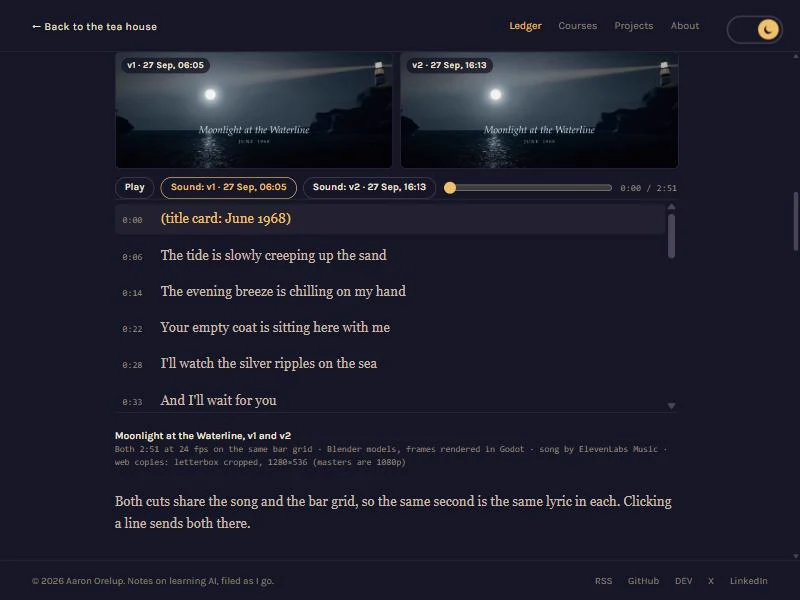
- **The two synced cuts in [my music video post](https://aaronorelup.com/ledger/moonlight-two-cuts/) drifted apart, then
  froze.** They now stay together.
- **Several videos could play at once.** Now starting one pauses the rest.
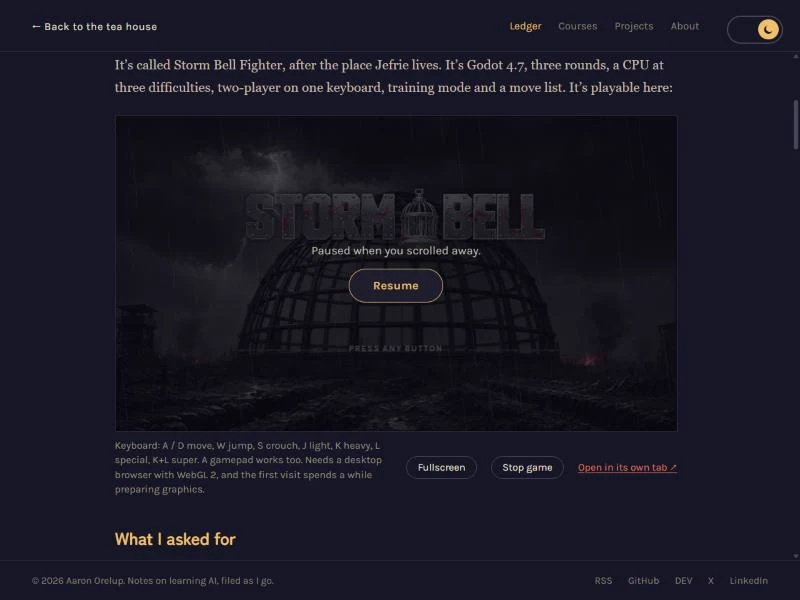
- **The fighting game in [my Storm Bell post](https://aaronorelup.com/ledger/storm-bell-fighter/) kept running off
  screen.** It now pauses, and a Stop game button unloads it.
- **I wanted to zoom into pictures.** Now every picture opens in a viewer that zooms, pans and pages
  through the post's other pictures.

<ao-compare cols="3" aspect="4/3">
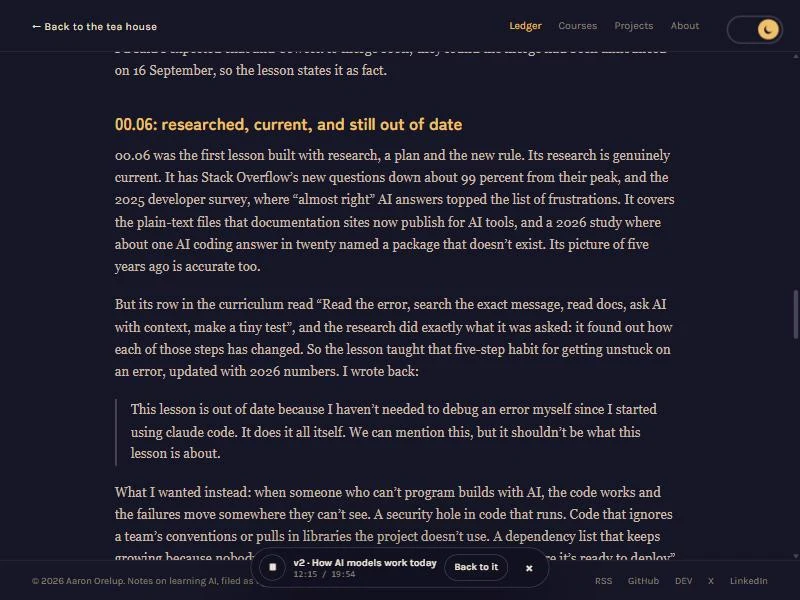
<figure><img src="https://aaronorelup.com/media/every-video-can-seek/now-playing-bar.webp" alt="A post scrolled past its video, with a bar at the bottom of the window naming the lesson still playing, its time, and Back to it and close buttons" loading="lazy"><figcaption><b>Sound keeps playing, and says so</b><span class="ao-meta">The lessons post · 12:15 into the 19:54 lesson</span></figcaption></figure>
<figure><img src="https://aaronorelup.com/media/every-video-can-seek/game-paused.webp" alt="The Storm Bell fighting game embedded in a post, dimmed, with the words Paused when you scrolled away and a Resume button, and Fullscreen and Stop game buttons under it" loading="lazy"><figcaption><b>The game, paused by scrolling</b><span class="ao-meta">The Storm Bell post · frames and audio held, not restarted</span></figcaption></figure>
<figure><img src="https://aaronorelup.com/media/every-video-can-seek/two-cuts-in-step.webp" alt="Two cuts of the Moonlight at the Waterline music video side by side above a scrolling list of timed lyrics, with one Play button and a Sound button for each cut" loading="lazy"><figcaption><b>Two cuts, one clock</b><span class="ao-meta">The music video post · one Play, sound from one cut at a time</span></figcaption></figure>
</ao-compare>

<details><summary>How each of those fixes works</summary>

- **The screenshots** are the audit session's own, from 7 October, taken in Claude's browser pane
  on a local copy of the site running the real Worker.
- **The synced videos.** The player kept the second cut in step by jumping it to the first
  several times a second. Each jump made the browser throw away what it had buffered, so the
  second cut stalled for good. Now it speeds the second video up or slows it down by up to 8%
  until they line up (within 0.04 s in testing), and only jumps when they're more than 0.6 s
  apart. One more bug turned up in the rewrite. If both stalled at once, each waited for the other
  to start playing, and neither ever did.
- **One player at a time.** A silent loop pauses when you scroll past it and resumes when you
  come back. Anything with sound keeps playing, with a bar at the bottom of the window that says
  what it is.
- **The game** also pauses when the tab is hidden or when anything else on the page plays. Its
  frames and audio are held, not restarted.

</details>

## Why the earlier checks passed

Every one of these was checked in a browser before it shipped. The audit session's notes in the
rules file say why that wasn't enough.

- **The local test server answers range requests by itself.** That's the copy of the site an agent
  runs while it builds, so seeking worked there. The rule now is to test media on the built site
  with the real Worker.
- **Claude's browser pane, where it checks pages, only draws a page while it's shown or
  screenshotted.** In between, a video you've just scrolled to still counts as off screen, so a
  feature can pass there and fail for a person.

*The audit was one Claude session: 2 hours 30 minutes and 334 tool calls, $35 at API list
prices. I'm on a flat subscription.*
