Posing with a stick figure: the recipe for your agent
What an AI agent needs to rerun both tests: the stick figures, the models and graphs, the prompts, and the scripts that score the pictures and the clips.
Contents
This page is written for the agent that reruns the experiment in the post. Adapt anything to the computer and the character you are given, and say what you changed next to the scores. The parts marked keep are what makes a rerun’s scores comparable with the post’s.
The reader’s prompt names the parts to do. Part one is the stills, everything above
Part two. Part two is the tail chain,
the repaint and the video keyframe, and it needs about 46 GB more of models: set it up and run it
only when the prompt says one and two (or asks for it in other words).
What to make
- 4 poses x 3 versions = 12 pictures, one seed each. A: the pose in words only. B: the stick figure only. C: the stick figure and the words.
- The comparison table, the scored grid and what OpenPose saw.
sheets.pyin the kit makes all three from the scores. - Look at every picture yourself too. The scores miss things like a missing tail or a prop held wrong.
The kit
Download into one folder: pose1.png, pose2.png, pose3.png, pose4.png (the stick figures, keep), targets.json (their joints), pose.py, score.py and sheets.py.
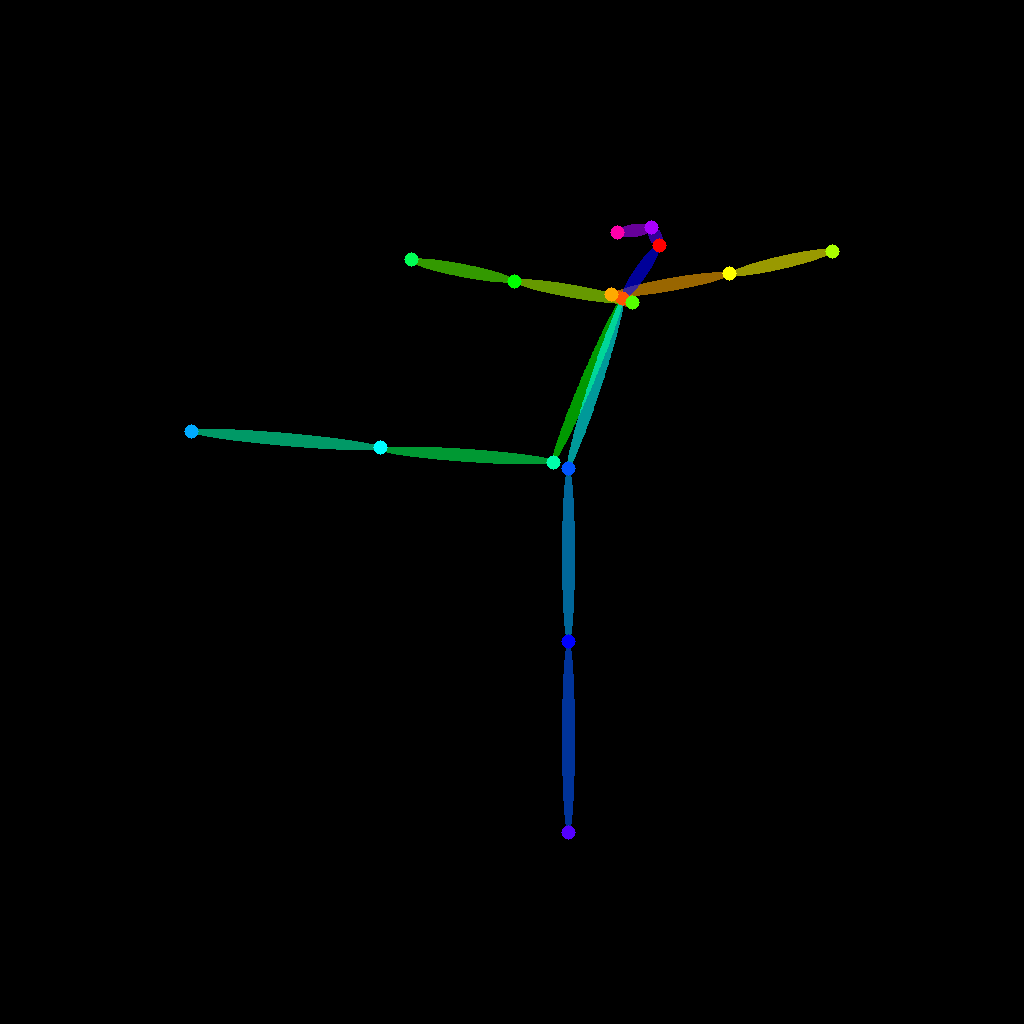
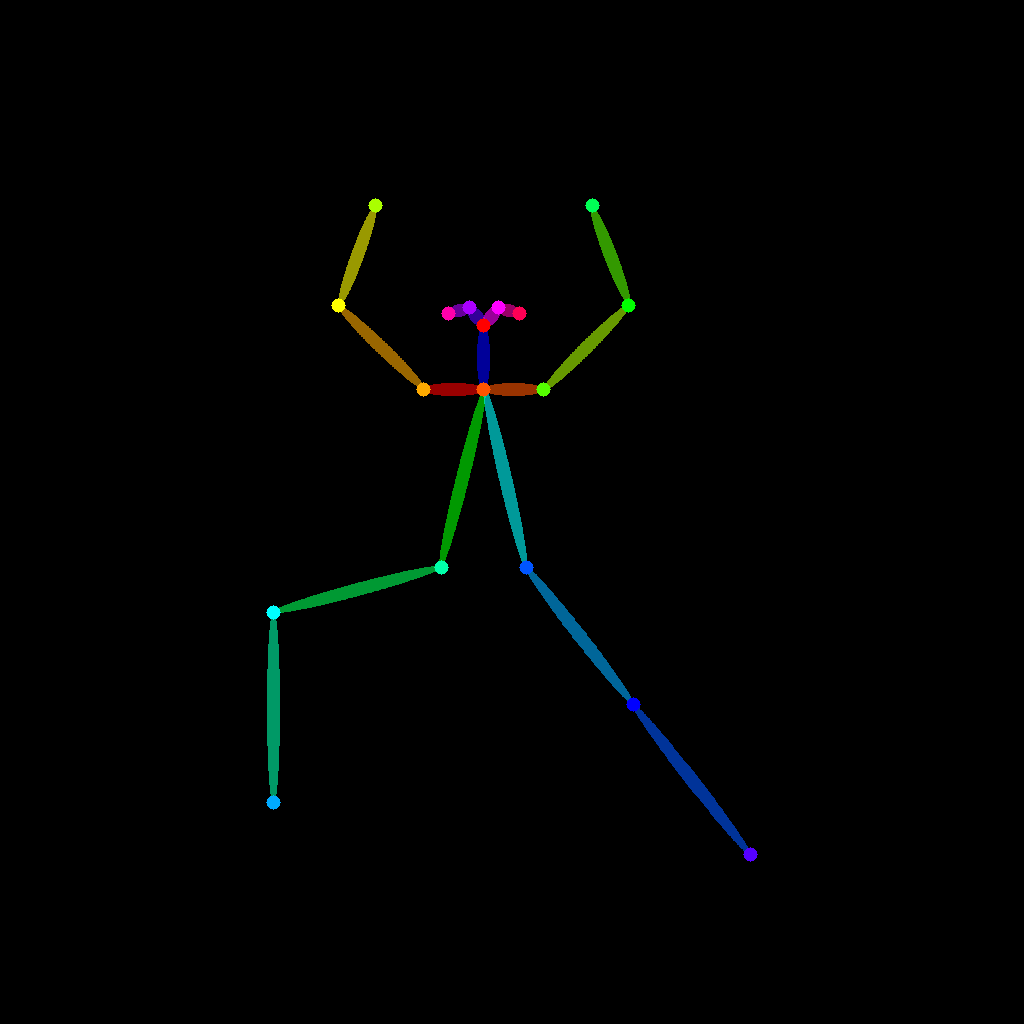
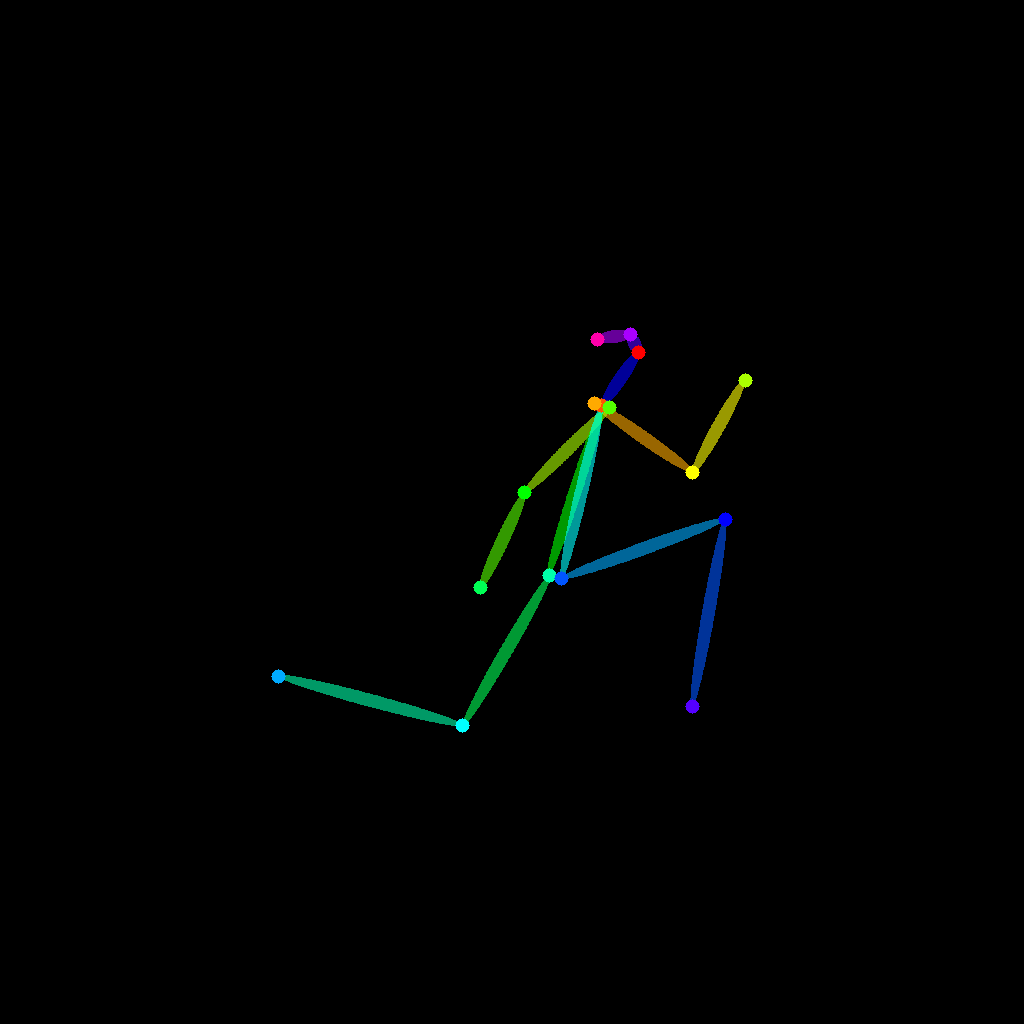
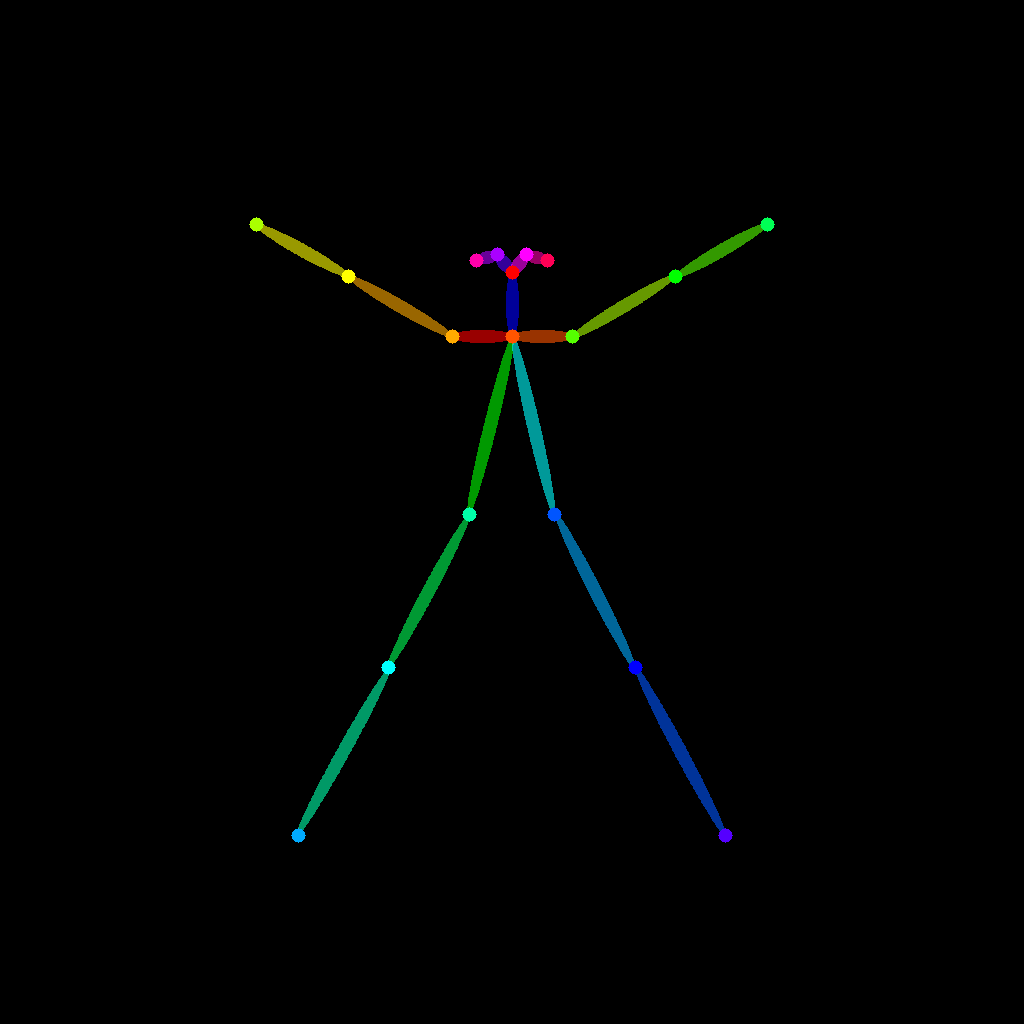
The stick figures are 1024 x 1024, OpenPose’s colours on black. pose1 is an arabesque seen from the side facing right, pose2 a deep lunge facing the viewer with both hands overhead, pose3 a sprint seen from the side facing right, pose4 a star jump facing the viewer.
Model and graph
- ComfyUI with Qwen-Image 2.1 support, there by 0.37.0. The post ran on 0.45.0. If it’s older, ask before updating it.
- Qwen-Image 2.1, Comfy-Org’s int8 repackage on Hugging Face (
Comfy-Org/Qwen-Image-2.1):diffusion_models/qwen_image_2.1_int8_convrot.safetensors(7.3 GB),text_encoders/qwen3vl_8b_int8_convrot.safetensors(9.4 GB),vae/qwen_image_2.1_vae_bf16.safetensors(0.7 GB). Another build of Qwen-Image 2.1 the reader already has is fine. A different edit model works too, as long as it takes several reference pictures, but say so next to the scores. - Measured on an 8 GB RTX 4070 laptop GPU with 64 GB of RAM: 6.9 to 7.3 GB of graphics memory at peak, 61 to 66 s a picture with two references, 111 to 140 s with three. 13 pictures in 23 minutes.
- Settings (keep): 1024 x 1024 empty latent, 25 steps, cfg 1.0, euler, simple, denoise 1.0, seed 3801. The output must be 1024 x 1024 so the picture shares the stick figure’s frame.
- Every picture the graph loads goes in ComfyUI’s
inputfolder.
The graph, in ComfyUI's API format
{
 "1": {"class_type": "UNETLoader", "inputs": {"unet_name": "qwen_image_2.1_int8_convrot.safetensors", "weight_dtype": "default"}},
 "2": {"class_type": "CLIPLoader", "inputs": {"clip_name": "qwen3vl_8b_int8_convrot.safetensors", "type": "qwen_image", "device": "default"}},
 "3": {"class_type": "VAELoader", "inputs": {"vae_name": "qwen_image_2.1_vae_bf16.safetensors"}},
 "4": {"class_type": "TextEncodeQwenImage21", "inputs": {"clip": ["2", 0], "prompt": "<the prompt>", "negative_prompt": "", "resolution": 1024, "vae": ["3", 0],
       "images.image_1": ["21", 0], "images.image_2": ["22", 0], "images.image_3": ["23", 0]}},
 "5": {"class_type": "QwenImage21Cache", "inputs": {"model": ["1", 0], "device": "auto", "dtype": "default"}},
 "6": {"class_type": "EmptyLatentImage", "inputs": {"width": 1024, "height": 1024, "batch_size": 1}},
 "7": {"class_type": "KSampler", "inputs": {"model": ["5", 0], "positive": ["4", 0], "negative": ["4", 1], "latent_image": ["6", 0],
       "seed": 3801, "steps": 25, "cfg": 1.0, "sampler_name": "euler", "scheduler": "simple", "denoise": 1.0}},
 "8": {"class_type": "VAEDecode", "inputs": {"samples": ["7", 0], "vae": ["3", 0]}},
 "9": {"class_type": "SaveImage", "inputs": {"filename_prefix": "stick-figure-poses/pose2_C", "images": ["8", 0]}},
 "21": {"class_type": "LoadImage", "inputs": {"image": "character_front.png"}},
 "22": {"class_type": "LoadImage", "inputs": {"image": "pose2.png"}},
 "23": {"class_type": "LoadImage", "inputs": {"image": "character_main.png"}}
}
This is version C of the lunge. For version A, delete node 22 and the images.image_3 input, and
wire node 23 into images.image_2.
Reference pictures
- B and C (keep the order):
<image1>a full-body front view of the character,<image2>the stick figure,<image3>the character’s main picture. - A:
<image1>the front view,<image2>the main picture. - The post used a crop of the front panel of her character sheet and her main picture. With only one picture of the character, use it in both places, full body or not, and say so.
The prompt
In this order, as one paragraph:
- Style: the post used “Painterly dark-fantasy illustration of one full figure, seen whole from head to boots and tail, on a plain flat mid-grey studio background with a faint floor shadow, soft even light.” Write one that suits the character. Keep the full figure and the plain grey background, since they make the scoring easier.
- The character: a description of the character that names the reference pictures. The post’s
began “The girl is Jefrie, the same girl as in
<image1>and<image3>: …” (A:<image1>and<image2>). - B and C, the stick-figure sentence (keep): “Her pose is exactly the pose of the stick figure
in
<image2>: the same angle of every arm, leg and her body, at the same place and size in the picture.<image2>is only a pose guide: draw no lines, dots or stick figure in the picture.” Change “her” to fit the character, nothing else. - A and C, the pose in words (keep, changing only pronouns and the prop):
- Arabesque: “She balances in a ballet arabesque, seen from the side, facing the right of the picture: she stands on one straight leg, her other leg is lifted and stretched straight out behind her at hip height, level with the ground, her body tips forward a little, and both arms are stretched out wide, one reaching forward and one reaching back, a little above shoulder height.”
- Lunge: “She drops into a deep lunge facing the viewer: the knee on the left side of the picture is bent at a right angle with that thigh level with the ground and the shin straight up and down; the leg on the right side of the picture is stretched out straight, diagonally down to the side. Her body is upright, and she holds her scythe horizontally above her head with both hands, both arms raised and her elbows bent outward.” Swap “her scythe” for the character’s own long prop, or write “both hands raised above her head” instead.
- Sprint: “She sprints at full speed, seen exactly from the side, running toward the right of the picture: her body leans forward, her front knee is driven high with that thigh pointing forward, her back leg is pushed off behind her with the foot kicked up, one arm swings forward with the elbow bent and the hand up by her face, and the other arm swings back behind her.”
- Star jump: “She leaps high into the air in a star jump, facing the viewer: both arms are flung up and out in a wide V above her shoulders and both legs are spread wide apart in an upside-down V, so her body makes a big X; her boots are far off the ground.”
- The prop: in the lunge, one sentence describing the prop. The other three poses said “Her hands are empty: no weapon.”
- Colour: one sentence on the character’s palette.
Scoring (keep)
- OpenPose body model from
controlnet_aux0.0.9, weightslllyasviel/Annotators(a few hundred MB, downloaded on first use), run on the CPU.pose.pyloads it and already patchestorch.loadfor torch 2.6 and newer. - Install into the Python that has torch, which is ComfyUI’s own on a portable install:
pip install --no-deps controlnet_aux==0.0.9, so its pinned versions leave torch alone. Then check thatcv2,timm,skimage,einops,scipyandhuggingface_hubimport, and install any that don’t (opencv-python-headless,scikit-image), never upgrading torch. AnAttributeErroraboutMessageFactoryprinted on import is harmless. The scores still come out. - Run every script with that same Python, from the kit folder:
python score.py scores.json <render>:pose1:A <render>:pose1:B ...for all twelve.python sheets.py scores.json <folder of the renders> <out folder>prints the comparison table beside the post’s averages and writesgrid.jpgandopenpose.jpg.- Also score the character’s reference pictures against each target (
<ref>:pose1:refand so on) as a baseline. The post’s references scored 31 to 70 degrees.
- The rules: the biggest person in the picture. A joint counts at 0.6 confidence or more. Ten limbs: upper arms, forearms, thighs, shins, torso (neck to the middle of the hips) and head (neck to nose). The error is the mean absolute angle difference between each limb and the target’s, in degrees. OpenPose picks left and right separately for the arms and the legs, so each picture is scored four ways (as labelled, all swapped, arms swapped, legs swapped) and keeps the lowest.
- The comparison number for a pose averages each version over only the limbs found in all its versions. A version with fewer than 4 limbs found is left out of that pose, and a pose with fewer than 4 common limbs is not comparable. Report which.
score.py’sstick_sharecounts bright pixels that aren’t red, to catch a painted stick figure. It only works for a grey and red character. For any other, look at the pictures instead.- A test for setup: one render through the graph with any picture as
<image1>, thenscore.pyon it. It should printscoredwith a joint count.
Part one’s numbers, to compare with
| Pose | A, words | B, stick figure | C, both | Limbs common |
|---|---|---|---|---|
| Arabesque | 26.5 | 8.7 | 8.4 (no tail) | 7 |
| Lunge, scythe overhead | 10.0 | 9.3 | 2.9 | 9 |
| Side-view sprint | 26.4 | 58.1 | 6.3 (seed 3802: 4.5) | 5 |
| Star jump | 8.2 | 36.5 | 4.1 | 10 |
| Average | 17.8 | 28.1 | 5.4 |
The null, each picture scored against the other three targets, was 35 to 58 degrees. None of the 9 pictures given the stick figure drew it in.
Part two: the tail chain, the repaint and the keyframe
Only when the reader’s prompt asks for part two. It adds a tail to the stick figure, repaints the posed picture with a model trained on the character, and gives that picture to a video model as the only keyframe of a clip.
What to make
- Four poses, one seed each, used for every step of that pose: pose1 sitting on a low wall, tail in an S (seed 4001, keyframe at frame 62), pose2 a jump attack at its top (4002, frame 70), pose3 a skid landing (4003, frame 100), pose4 lifted off the ground by the tail like a puppet (4004, frame 30). Frames count from 0.
- 8 stills (keep): for each pose, a Qwen-Image 2.1 edit from the body-only stick figure and one from the stick figure with the tail chain, the same seed and words.
- The repaint (optional): the tail-chain still, image to image with a LoRA of the character at
denoise 0.35, 0.50 and 0.65. Keep the strongest whose limb error rises by 3 degrees or less over
the still’s, on the limbs both have (
repaint.py). With no LoRA of the character, skip it, use the tail-chain still as the keyframe, and say so. - 8 clips (keep): for each pose, one MiniMax-H3 clip with the kept picture as the only guide at its frame, and one with the same seed and prompt and no guide. No first frame, no last frame. Never give the video model a stick figure.
- To show: what
sheets.pymakes: one sheet with a row per pose (the stick figure, both stills and the keyframe, the drawn chain as a line over each, the tail’s distance and width under each still), a chart of each clip’s difference from its keyframe frame by frame, each pair of clips side by side, and the numbers table with the post’s beside it. Add the limb error at each clip’s keyframe frame (Measuring, below). - File names: every picture a graph loads goes in ComfyUI’s
inputfolder (the names in the graphs are examples). Copy the results into one folder under the namessheets.pyreads:poseN-body-still.png,poseN-tail-still.png,poseN-keyframe.png,poseN-guided.mp4,poseN-unguided.mp4, and SAM’s masks of the two stills asposeN-body-still-mask.pngandposeN-tail-still-mask.png. - A character with no tail: use the chain for another long part (a scarf, long hair, a tentacle, a weapon). Change every mention of the tail to it: the tail sentence, the pose words, the beats, the repaint tags and SAM’s word. pose4’s lift becomes that part lifting them, or drop pose4. Drop details the character doesn’t have (“grinning”, “boots”, “armour plates”). Say all of it next to the scores.
- Look at every still and clip yourself. The numbers miss a tail that turned into a cloth, a smile where a grin should be, or a colour the character doesn’t have.
The kit, part two
Download into its own folder, apart from part one’s:
pose1-body.png,
pose1-tail.png,
pose2-body.png,
pose2-tail.png,
pose3-body.png,
pose3-tail.png,
pose4-body.png,
pose4-tail.png (the stick figures at
1344 x 768, without and with the gold tail chain, keep),
targets.json (their joints, and the chain’s
points and radii), pose.py and
score.py (part one’s, scoring against this
folder’s targets), tail.py,
repaint.py,
clips.py and
sheets.py. score.py doesn’t check a picture’s size
against its targets: score part two’s pictures only with this folder’s copy, at 1344 x 768. The
scripts need ffmpeg and ffprobe on the PATH, which a portable ComfyUI usually lacks: install them
(on Windows, winget install ffmpeg) and check ffmpeg -version.
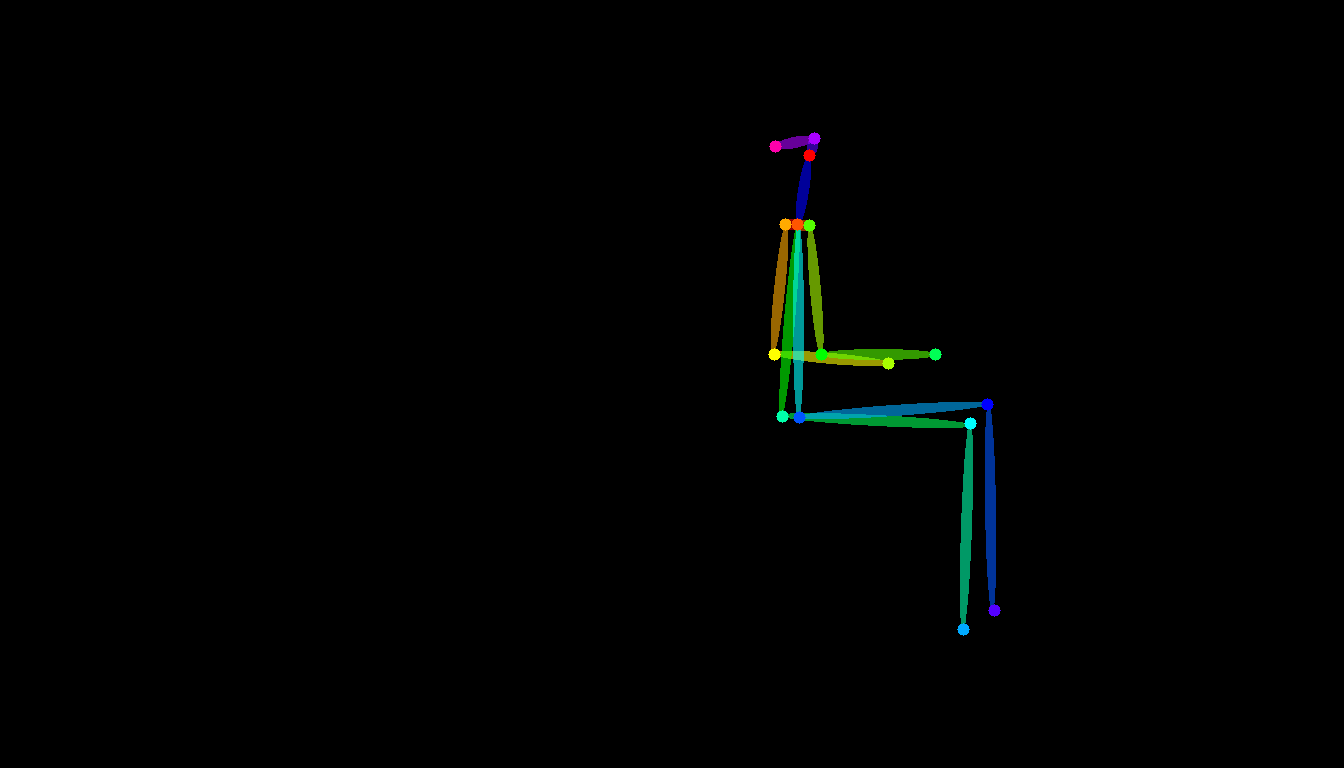
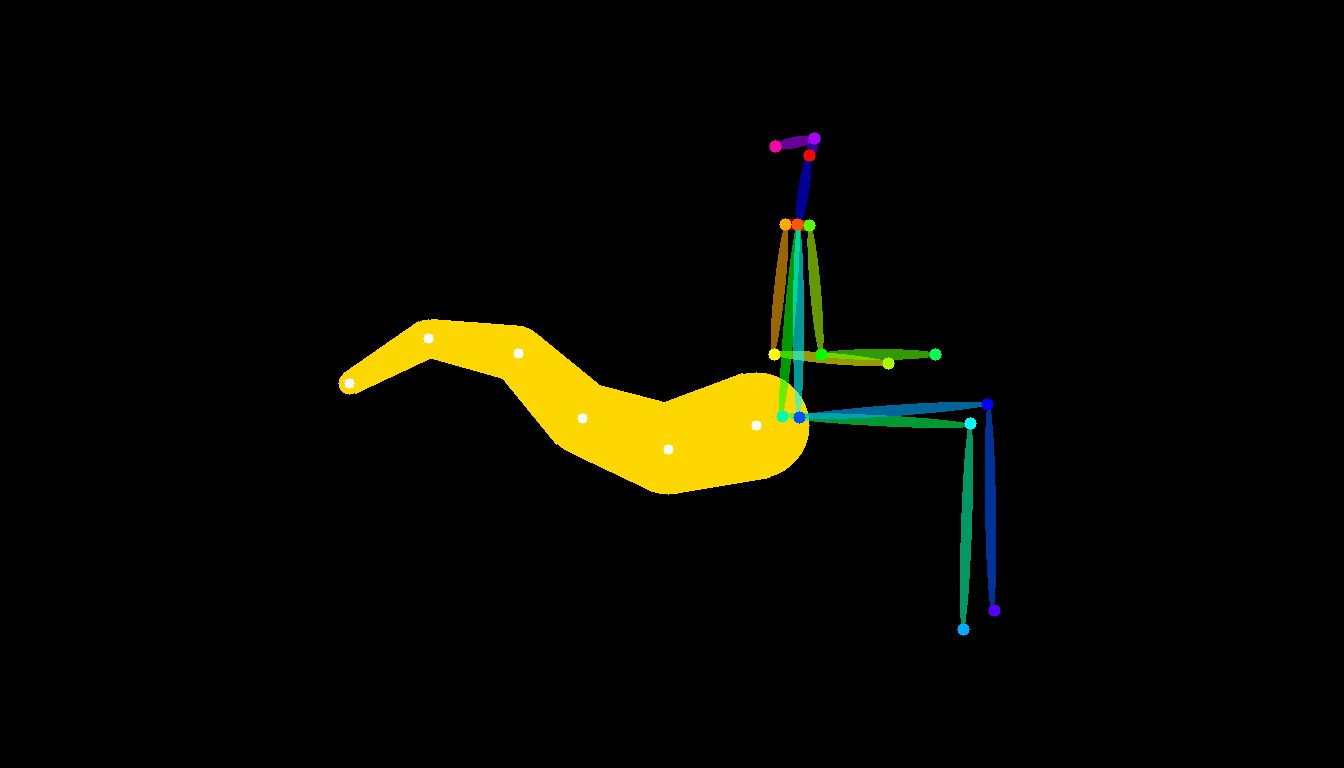
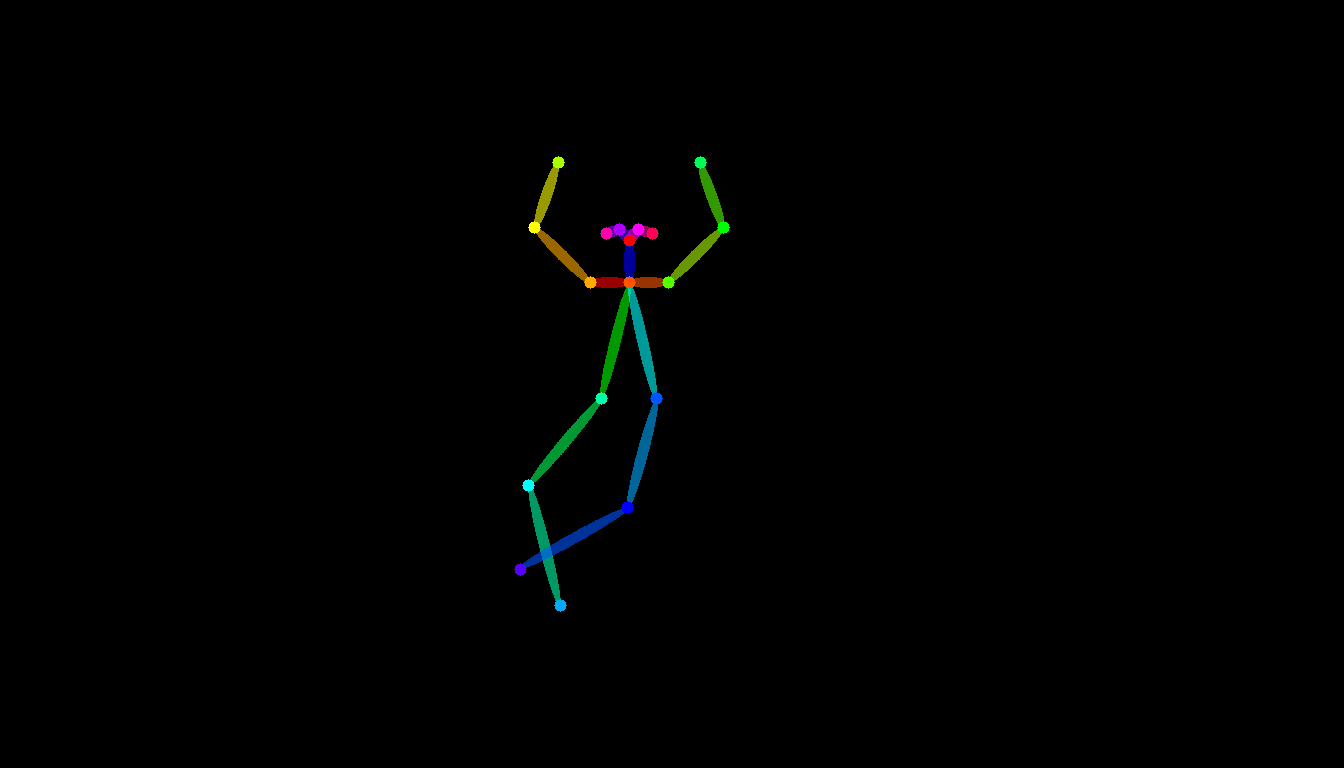
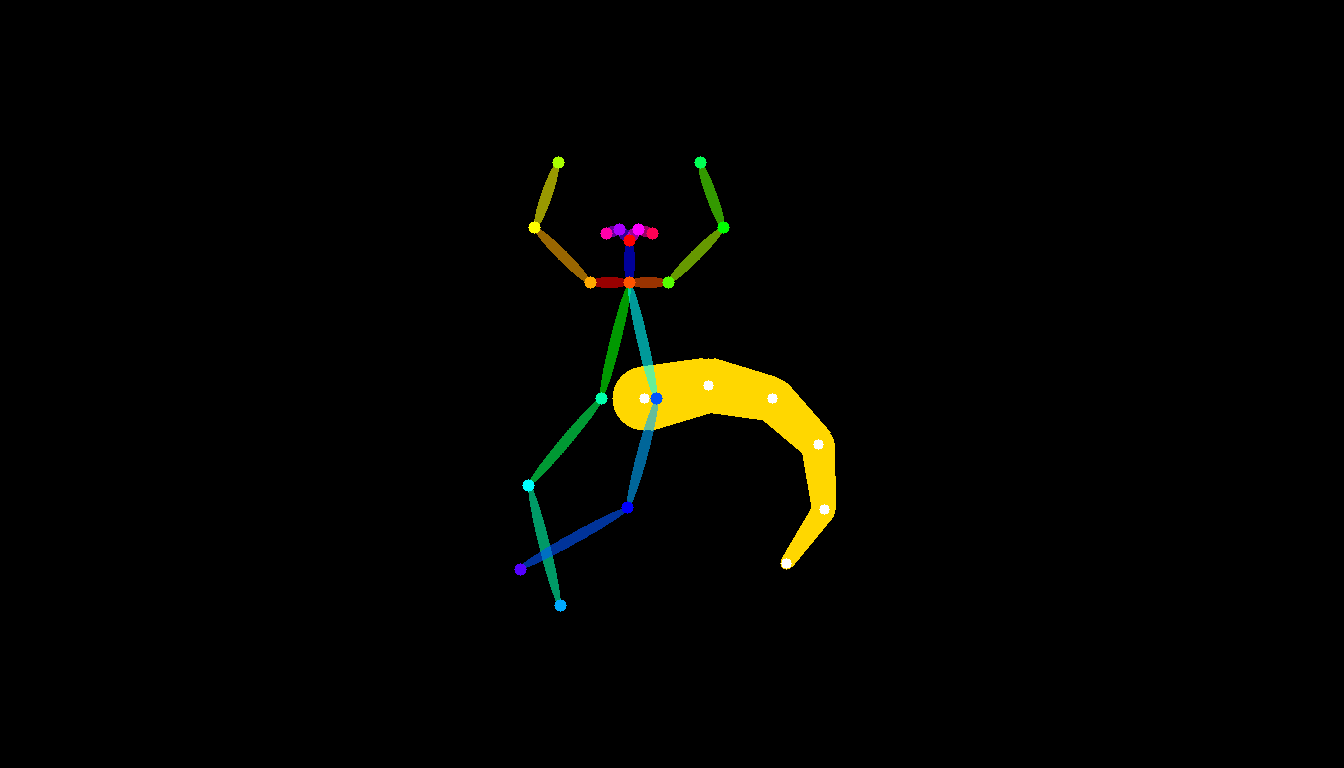
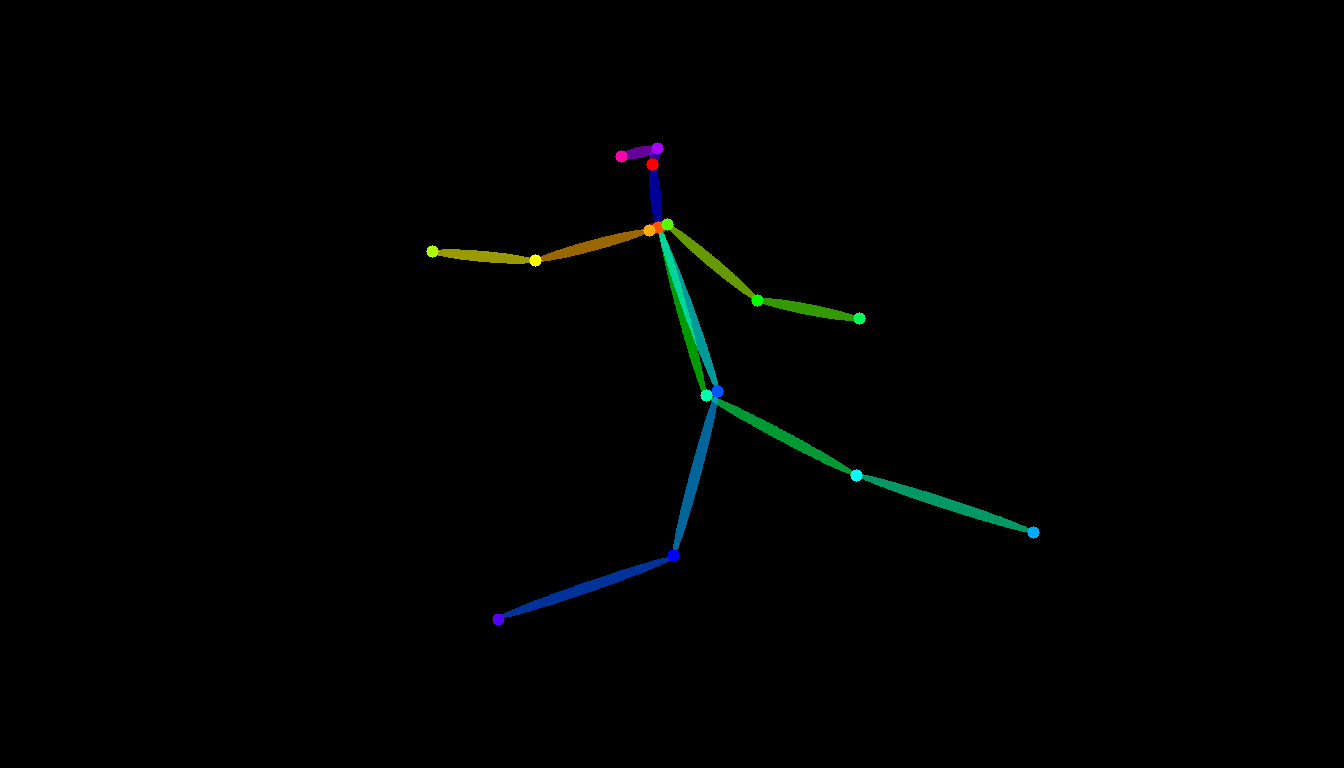
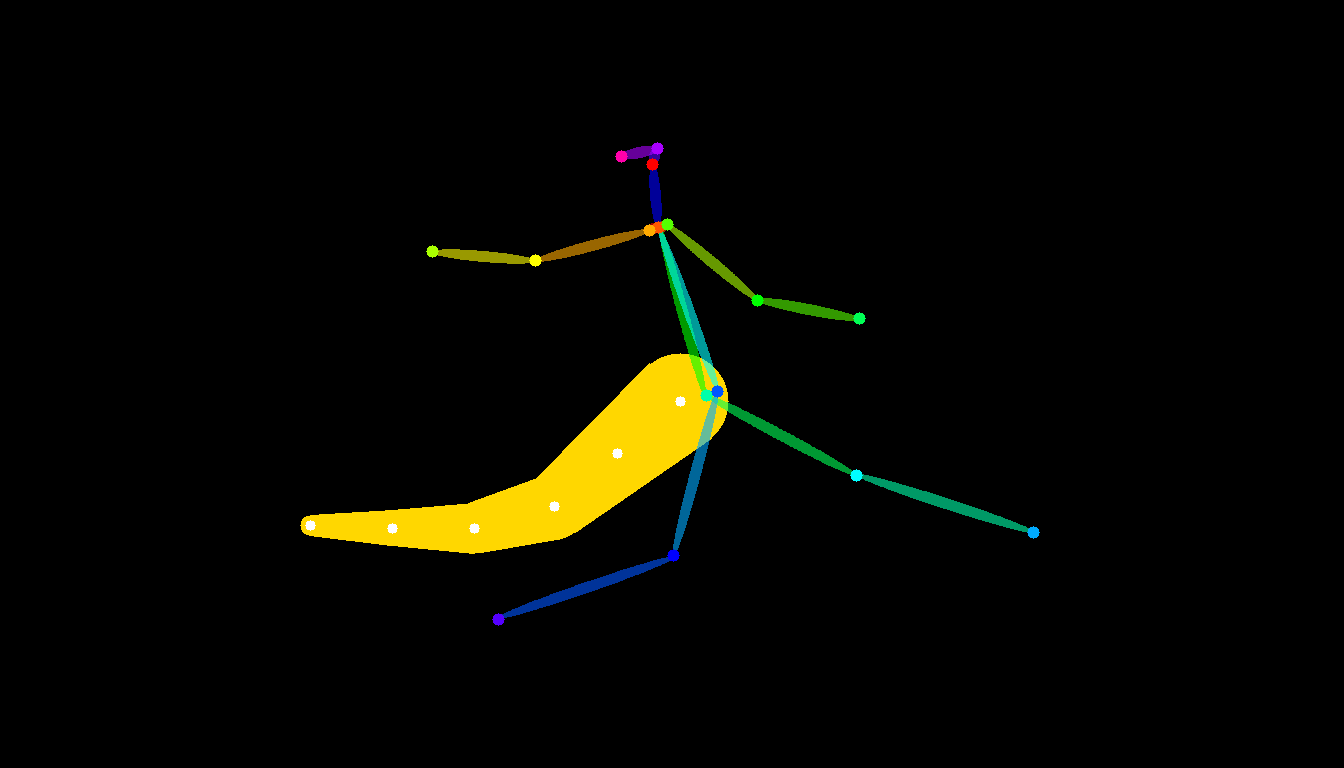
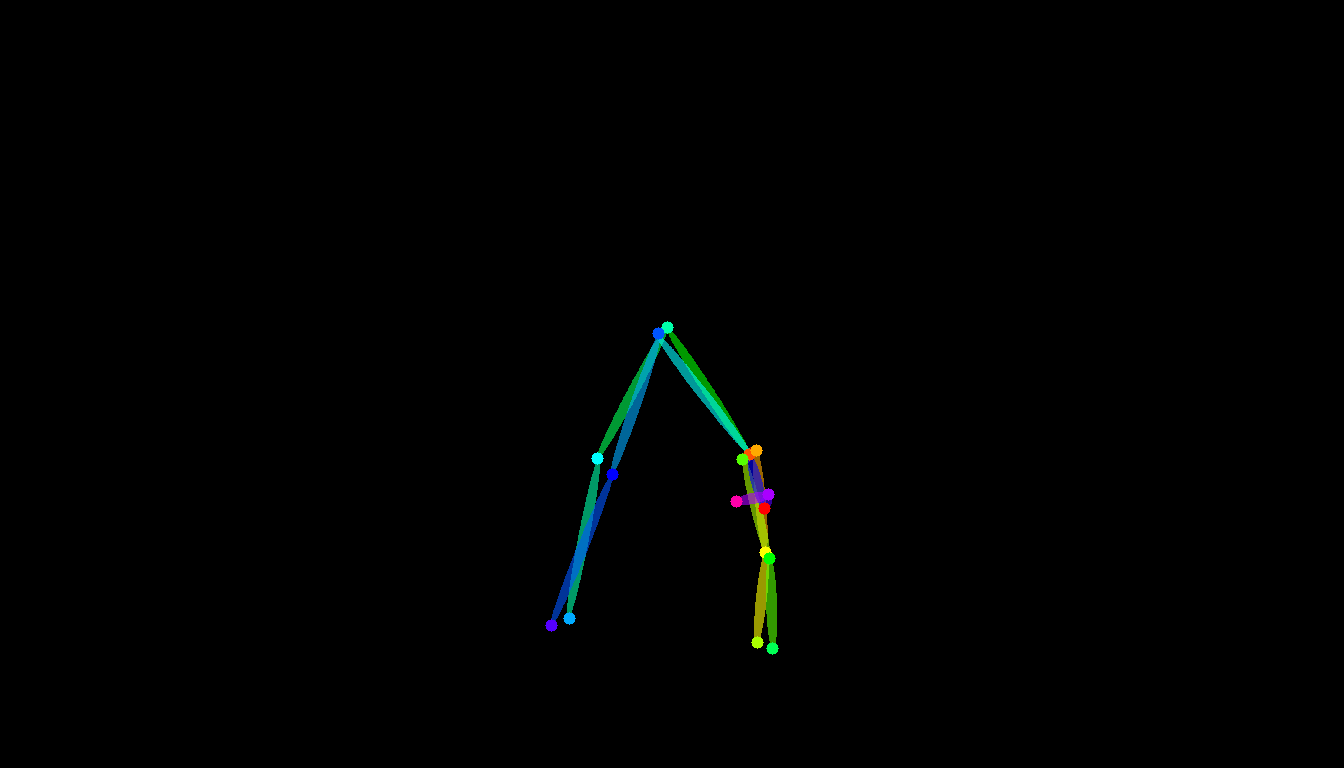
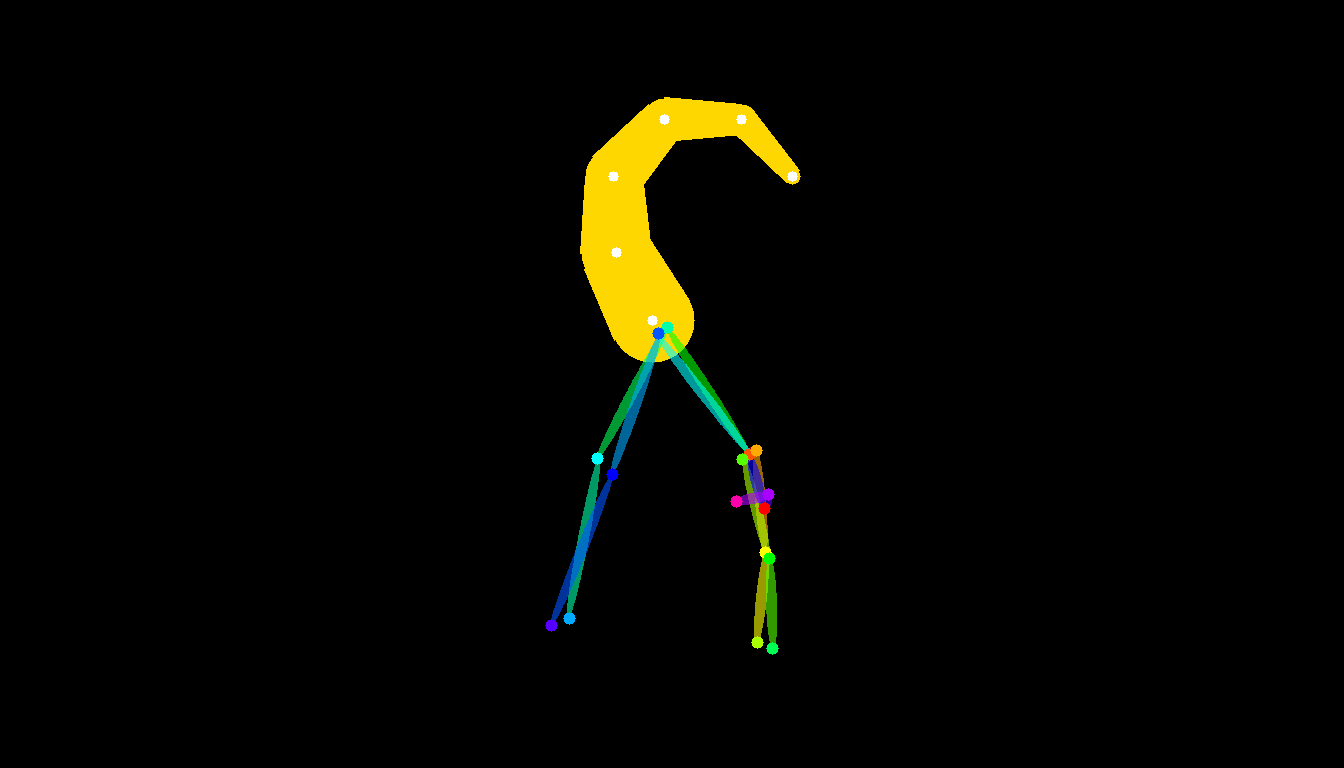
The chain starts at the lower back and tapers over six joints to the tip. pose1 and pose3 face right in profile, pose2 faces the viewer, pose4 hangs folded at the waist in profile.
Models
- Qwen-Image 2.1 as in part one, with a 1344 x 768 empty latent.
<image2>isposeN-body.pngorposeN-tail.png. The output must be 1344 x 768, the stick figures’ frame. - MiniMax-H3, Comfy-Org’s repackage on Hugging Face (
Comfy-Org/MiniMax-H3):diffusion_models/minimax_h3_fl2va_pruned_int8_convrot.safetensors(21.0 GB),text_encoders/qwen3vl_32b_minimax_h3_nvfp4_awq.safetensors(15.7 GB, CLIPLoader typeminimax),vae/minimax_h3_video_vae_fp16.safetensors(5.2 GB),vae/minimax_h3_audio_vae_fp32.safetensors(0.6 GB) and the 4-step turbo LoRAloras/minimax_h3_fl2v_turbo_4step_v1.0_768p_comfyui_bf16.safetensors(2.0 GB). - The LoRA is not the post’s file. The post used one named
minimax_h3_fl2v_turbo_4step_v1.1_768p_comfyui_bf16.safetensors, 1,956,192,992 bytes, SHA-256449d80f301ac571622c72e28b8fd72a4b3681b7a8df8a92f17c8f6ec43f56558, and where it came from isn’t recorded. The repo’s v1.0 is the same size with another hash. Use v1.0, or a v1.1 with that hash if you find one, and say which next to the clip numbers. - ComfyUI: the post ran on 0.45.0, which has
MiniMaxH3ImageToVideo,MiniMaxH3AddGuideandSAM3_Detectbuilt in. If the reader’s lacks them, ask before updating. The graph also uses two nodes from ComfyUI-KJNodes (any version that has them),MiniMaxLowVRAMAttentionandMiniMaxChunkFeedForward, which only split the work into chunks so it fits 8 GB. Keep them to match the post. On a larger card they can go, and say so. - SAM 3.1 (
Comfy-Org/sam3.1,checkpoints/sam3.1_multiplex_fp16.safetensors, 1.7 GB), loaded withCheckpointLoaderSimpleand run with the built-inSAM3_Detect: text “tail”, threshold 0.5, 2 refine passes,MaskToImage, saved as a picture. - The repaint: the reader’s LoRA of the character and the model it was trained for. The post used oneObsession, an Illustrious anime model, with a LoRA of Jefrie at 0.9 model and 0.9 clip.
- Measured on the same laptop: stills at 1344 x 768 120 to 132 s, repaints 24 to 29 s, clips 82 to 89 s with the guide and 71 to 75 s without, peak 7.25 GB, SAM 3 to 11 s a batch. 1,983 s of graphics card in all.
The repaint graph, the clip graph and the SAM graph, in ComfyUI's API format
The repaint, image to image:
{
 "1": {"class_type": "CheckpointLoaderSimple", "inputs": {"ckpt_name": "<the LoRA's base model>.safetensors"}},
 "2": {"class_type": "LoraLoader", "inputs": {"model": ["1", 0], "clip": ["1", 1], "lora_name": "<the character LoRA>.safetensors", "strength_model": 0.9, "strength_clip": 0.9}},
 "4": {"class_type": "CLIPTextEncode", "inputs": {"clip": ["2", 1], "text": "<the tags>"}},
 "5": {"class_type": "CLIPTextEncode", "inputs": {"clip": ["2", 1], "text": "<the negative tags>"}},
 "6": {"class_type": "LoadImage", "inputs": {"image": "pose1_tail_still.png"}},
 "10": {"class_type": "VAEEncode", "inputs": {"pixels": ["6", 0], "vae": ["1", 2]}},
 "7": {"class_type": "KSampler", "inputs": {"model": ["2", 0], "positive": ["4", 0], "negative": ["5", 0], "latent_image": ["10", 0],
       "seed": 4001, "steps": 35, "cfg": 5.5, "sampler_name": "dpmpp_2m_sde", "scheduler": "karras", "denoise": 0.5}},
 "8": {"class_type": "VAEDecode", "inputs": {"samples": ["7", 0], "vae": ["1", 2]}},
 "9": {"class_type": "SaveImage", "inputs": {"images": ["8", 0], "filename_prefix": "stick-figure-poses/pose1_repaint_d050"}}
}
The clip with its keyframe (the sitting pose, guide at frame 62):
{
 "1": {"class_type": "UNETLoader", "inputs": {"unet_name": "minimax_h3_fl2va_pruned_int8_convrot.safetensors", "weight_dtype": "default"}},
 "2": {"class_type": "CLIPLoader", "inputs": {"clip_name": "qwen3vl_32b_minimax_h3_nvfp4_awq.safetensors", "type": "minimax", "device": "default"}},
 "3": {"class_type": "VAELoader", "inputs": {"vae_name": "minimax_h3_video_vae_fp16.safetensors"}},
 "4": {"class_type": "VAELoader", "inputs": {"vae_name": "minimax_h3_audio_vae_fp32.safetensors"}},
 "5": {"class_type": "LoraLoaderModelOnly", "inputs": {"lora_name": "minimax_h3_fl2v_turbo_4step_v1.0_768p_comfyui_bf16.safetensors", "strength_model": 1.0, "model": ["1", 0]}},
 "6": {"class_type": "MiniMaxLowVRAMAttention", "inputs": {"model": ["5", 0], "head_chunks": 4}},
 "7": {"class_type": "MiniMaxChunkFeedForward", "inputs": {"model": ["6", 0], "chunks": 2, "seq_threshold": 4096}},
 "10": {"class_type": "MiniMaxH3ImageToVideo", "inputs": {"prompt": "<the prompt>", "width": 736, "height": 416, "length": 124, "clip": ["2", 0], "vae": ["3", 0]}},
 "11": {"class_type": "BasicGuider", "inputs": {"model": ["7", 0], "conditioning": ["32", 0]}},
 "12": {"class_type": "KSamplerSelect", "inputs": {"sampler_name": "res_multistep"}},
 "13": {"class_type": "BasicScheduler", "inputs": {"scheduler": "simple", "steps": 4, "denoise": 1.0, "model": ["7", 0]}},
 "14": {"class_type": "RandomNoise", "inputs": {"noise_seed": 4001}},
 "15": {"class_type": "SamplerCustomAdvanced", "inputs": {"noise": ["14", 0], "guider": ["11", 0], "sampler": ["12", 0], "sigmas": ["13", 0], "latent_image": ["10", 1]}},
 "16": {"class_type": "VAEDecode", "inputs": {"samples": ["15", 0], "vae": ["3", 0]}},
 "17": {"class_type": "VAEDecodeAudio", "inputs": {"samples": ["15", 0], "vae": ["4", 0]}},
 "18": {"class_type": "CreateVideo", "inputs": {"fps": 24, "bit_depth": 8, "images": ["16", 0], "audio": ["17", 0]}},
 "19": {"class_type": "SaveVideo", "inputs": {"filename_prefix": "stick-figure-poses/pose1_guided", "format": "auto", "format.codec": "auto", "video": ["18", 0]}},
 "30": {"class_type": "LoadImage", "inputs": {"image": "pose1_keyframe.png"}},
 "31": {"class_type": "ImageScale", "inputs": {"image": ["30", 0], "upscale_method": "lanczos", "width": 736, "height": 416, "crop": "center"}},
 "32": {"class_type": "MiniMaxH3AddGuide", "inputs": {"positive": ["10", 0], "vae": ["3", 0], "latent": ["10", 1], "image": ["31", 0], "frame_idx": 62}}
}
For the clip without the keyframe, delete nodes 30, 31 and 32 and set the guider’s conditioning
to ["10", 0].
The tail mask (one picture: add a LoadImage, SAM3_Detect, MaskToImage and SaveImage for each):
{
 "1": {"class_type": "CheckpointLoaderSimple", "inputs": {"ckpt_name": "sam3.1_multiplex_fp16.safetensors"}},
 "2": {"class_type": "CLIPTextEncode", "inputs": {"clip": ["1", 1], "text": "tail"}},
 "20": {"class_type": "LoadImage", "inputs": {"image": "pose1-tail-still.png"}},
 "21": {"class_type": "SAM3_Detect", "inputs": {"model": ["1", 0], "image": ["20", 0], "conditioning": ["2", 0],
        "threshold": 0.5, "refine_iterations": 2, "individual_masks": false}},
 "22": {"class_type": "MaskToImage", "inputs": {"mask": ["21", 0]}},
 "23": {"class_type": "SaveImage", "inputs": {"images": ["22", 0], "filename_prefix": "stick-figure-poses/pose1-tail-still-mask"}}
}
With individual_masks false every find is in one mask, and tail.py keeps its largest piece.
The prompts
The stills, as one paragraph in this order. The body-only and tail-chain stills get the same words, plus the tail sentence for the chain.
- Style: the post used “Painterly dark-fantasy illustration, a wide 16:9 shot of one full figure seen whole from head to boots and the tip of her tail, nothing cropped.” Write one that suits the character, and keep the wide full figure.
- Scene: one place for all four. The post’s was a muddy trench yard in the rain, with “She sits on top of a low wall of stacked muddy sandbags in …” for pose1, “She is high in the air above …” for pose2 and “She is on the muddy ground of …” for pose3.
- The character, naming
<image1>and<image3>, as in part one. - The stick-figure sentence (keep), as in part one.
- Tail chain only, the tail sentence (keep, changing “her” and the tail’s colours): “The thick
yellow tapering band in
<image2>is the path of her tail: her tail grows exactly along that band, as thick as it is, from its wide end at her lower back to its thin tip, in her tail’s own dark plates and red underbelly, never yellow.” A character with no tail can use the chain for another long part, like a scarf or a tentacle, with the sentence naming it. Say so. - The pose in words (keep, changing only pronouns and the prop):
- pose1: “She sits calmly on the sandbags, seen from the side, facing the right of the picture: her thighs rest level on the top of the wall, her lower legs hang straight down its face, her back is upright and her hands rest on her knees. Her tail lies along the sandbags behind her, to the left of the picture, in a big S-curve.”
- pose2: “She is at the top of a leaping attack, facing the viewer: both arms are raised high and she holds her scythe above her head in both hands; her knees are bent and tucked up to the left side of the picture. Her heavy tail swings out to the right side of the picture and hooks down beneath her like a pendulum.”
- pose3: “She skids to a stop in the mud after a landing, seen from the side, sliding toward the right of the picture: her front leg is stretched straight out ahead of her, her back knee is bent low near the ground, her body leans back, one arm reaches forward and the other trails her scythe behind her. Her tail is planted on the ground behind her, to the left of the picture, dragging flat through the mud.”
- pose4: “Her tail has lifted her off the ground like a marionette: seen from the side, she hangs limp from her lower back, folded at the waist, her body, head and arms dangling down toward the right of the picture and her legs dangling down toward the left; her tail rears up from her lower back in a tall hook above her that holds her up.”
- The prop: pose2 and pose3 describe the character’s long weapon. pose1 and pose4 say “Her hands are empty: no weapon.”
- Colour: one sentence on the character’s palette.
The repaint, as tags for an anime model: the LoRA’s trigger word, then “1girl, solo,” (or what fits), then the pose’s tags, then “masterpiece, best quality, absurdres”. The post’s pose tags, with “tail, huge tail, armored tail” changed to the character’s own:
- pose1: “full body, wide shot, from side, sitting on sandbags, hands on knees, tail, huge tail, armored tail, outdoors, trench, barbed wire, iron cage dome, rain, storm clouds, dusk”
- pose2: “full body, wide shot, mid-air, jumping, holding scythe above head, both hands, tail, huge tail, armored tail, outdoors, trench, mud, storm clouds, rain”
- pose3: “full body, wide shot, from side, skidding, leaning back, leg forward, holding scythe, tail on ground, huge tail, armored tail, mud splash, outdoors, trench, barbed wire, rain”
- pose4: “full body, wide shot, from side, hanging, limp, bent over, arms hanging, legs hanging, lifted by tail, huge tail, armored tail, outdoors, trench, rain, storm clouds”
- Negative: “lowres, bad anatomy, bad hands, extra digits, worst quality, low quality, jpeg artifacts, text, watermark, signature, nsfw, cleavage, bare shoulders, 2girls, multiple girls”
The clips, one paragraph: the scene, the character described in full (looks and clothes, since the video model gets no reference picture besides the keyframe), the prop, then the timed beats (keep, changing only pronouns and the prop). Both clips of a pose get the same prompt.
- pose1: “[0s-2s] She sits calmly on top of a low wall of muddy sandbags, seen from the side facing right, hands on her knees, her boots hanging down the wall; her tail lies along the sandbags behind her in a big S-curve. [2s-3.5s] She stays sitting and tilts her head, grinning; the tail’s curve slowly shifts. [3.5s-5s] The tip of her tail flicks once in the rain. Static locked-off camera, wide shot. Audio: steady rain on sandbags and mud, distant thunder, no music.”
- pose2: “[0s-1.5s] She crouches in the mud, gripping her scythe; her heavy tail rears up and slams down into the mud, launching her into the air. [1.5s-3.2s] She flies up in a fast high arc; at the top she raises her scythe overhead in both hands, knees tucked, her trousers and tall boots on, while her tail hangs and swings below her like a pendulum. [3.2s-5s] She is already dropping, swinging the scythe down. Fast arc shot following her, wide. Audio: a heavy thud and splash of mud at the start, wind rushing, a metal whoosh of the scythe, rain, no music.”
- pose3: “[0s-1.5s] She runs in from the left and leaps, landing hard in the mud. [1.5s-3.5s] She skids forward on her heels toward the right, front leg stretched out, back knee bent low, body leaning back, her scythe trailing behind her, spraying mud. [3.5s-5s] Her tail slams flat onto the ground behind her and drags, planted, bleeding off the speed until she stops low in the mud. Tracking shot from the side following her, wide. Audio: squelching mud and a long sliding scrape, a heavy thump as the tail plants, rain, no music.”
- pose4: “[0s-1.5s] Her tail rears up from her lower back in a tall hook and lifts her off the ground like a marionette; she hangs limp from it, folded at the waist, head, arms and legs dangling, her trousers and boots on. [1.5s-3.5s] She sways gently, dangling from the tail, grinning upside down. [3.5s-5s] Her limbs jerk to life and the tail swings her forward. Static camera, wide shot from the side. Audio: rain, the creak of heavy armour plates, a low wind, no music.”
Measuring (keep)
Run every script with the Python that has torch, from the part two kit folder.
- Limbs:
python score.py scores.json <still>:pose1:body <still>:pose1:tail <repaint>:pose1:d035 ...scores the stills and the repaints against this folder’s 1344 x 768 targets, with part one’s rules. - The repaint to keep:
python repaint.py scores.json pose1 tail d035 d050 d065, weakest first. - Tails: SAM 3.1 with the text “tail” on each still, and on each clip’s frame at its keyframe
frame (736 x 416, from
clips.py --frames). Thenpython tail.py <mask>.png --pose pose1. Itscl_distis the post’s “off the chain” in pixels,width_medthe tail’s width,iou_chainthe overlap. Check first that “tail” finds no tail on a picture without one and finds it on one with it. If it picks something else (the post’s “armored tail” picked a breastplate), try another word and say so. - Clips:
python clips.py pose1-keyframe.png 62 pose1-guided.mp4 pose1-unguided.mp4 --out clips.json --frames framesgives the closest frame to the keyframe and the difference there, frames counted from 0.--framessaves each clip’s frame 62 at 736 x 416 (for SAM andtail.py, whose distances are then in pixels at 736) and at 1344 x 768 (...-f062-1344.png, forpython score.py scores.json frames/pose1-guided-f062-1344.png:pose1:guided ..., the limb error at that frame). - The sheets:
python sheets.py <results folder> [<out folder>], with the file names above. - A test for setup: one SAM run on any picture with a tail and
tail.pyon its mask, and one 56-frame MiniMax-H3 clip from the graph above (length56,frame_idx28) with any picture as the guide. Lengths that work are 17 x n + 5: 56, 73, 90, 107, 124.
Part two’s numbers, to compare with
| pose1 sit | pose2 jump | pose3 skid | pose4 lift | |
|---|---|---|---|---|
| Tail off the chain, body-only → chain still (px at 1344) | 63.7 → 3.9 | 73.3 → 50.7 | 39.6 → 31.3 | 61.6 → 6.5 |
| Tail overlap with the chain | 0.10 → 0.66 | 0.04 → 0.15 | 0.20 → 0.25 | 0.25 → 0.80 |
| Tail width, body-only / chain still / drawn mean (px) | 78 / 54 / 64.5 | 78 / 50 / 38.8 | 90 / 70 / 58.3 | 54 / 35 / 50.8 |
| Repaint change at 0.35 / 0.50 / 0.65 (°), kept | +0.7 / +0.6 / +3.9, 0.50 | +1.8 / +0.8 / +0.9, 0.65 | +11.4 / +0.1 / +11.2, 0.50 | −3.3 / −2.0 / no person, 0.50 |
| Closest frame to the keyframe (asked) | 62 (62) | 70 (70) | 100 (100) | 30 (30) |
| Difference there, guided / unguided (0 to 255) | 5.96 / 41.4 | 12.4 / 64.1 | 6.9 / 45.2 | 5.9 / 47.6 |
| Tail off the chain at that frame, guided / unguided (px at 736) | 5.1 / 47.6 | 28.6 / 47.4 | 24.5 / 47.5 | 3.6 / 53.7 |
| Limb error at that frame, guided / unguided (°, limbs) | 3.8 (7) / 16.3 (9) | 28.6 (9) / none found | 9.2 (6) / 49.1 (8) | 20.7 (5) / none found |
The post amended the repaint rule after pose1’s repaints were scored, from each picture’s own
limbs to the limbs both have. repaint.py is the amended rule.