Posing an AI character with a stick figure, in pictures and video
I gave an AI image editor a stick figure as a pose guide for my character and measured how close each picture came. Then I drew her tail in and used one posed picture as a video's keyframe. With prompts to rerun it.
Contents
I wanted to know if I could pose my character in an AI image editor just by showing it a stick figure, without ControlNet, the add-on people normally use for posing. A Claude agent drew four stick figures, gave each to Qwen-Image 2.1’s edit mode as an extra picture, and measured how far my character’s limbs landed from them. With the stick figure and the pose in words, her limbs were 5.4 degrees off on average, against 17.8 for words alone and 28.1 for the stick figure alone. A second run drew her tail into the stick figure and gave one posed picture to a video model as its only keyframe. All four clips came closest to that picture on the exact frame asked for.
- Stick figure plus words came closest on all four poses.
- The stick figure alone lost to words on average. On a side-view sprint the editor ignored it.
- It never painted the stick figure in. Not once in 17 pictures.
- A tail drawn into the stick figure moved her tail onto it in 2 of 4 poses.
- The keyframe set the whole clip. Without it, the same seed drew another design of her.
- Side views came back facing the viewer, and a repaint with a model trained on her turned her grin into a smile.
The character is Jefrie, and these were two of the daily experiments a Claude agent picks and runs on my laptop’s 8 GB graphics card. The pictures and clips are below to judge for yourself, and two prompts at the end rerun it on your own character.
The four stick figures
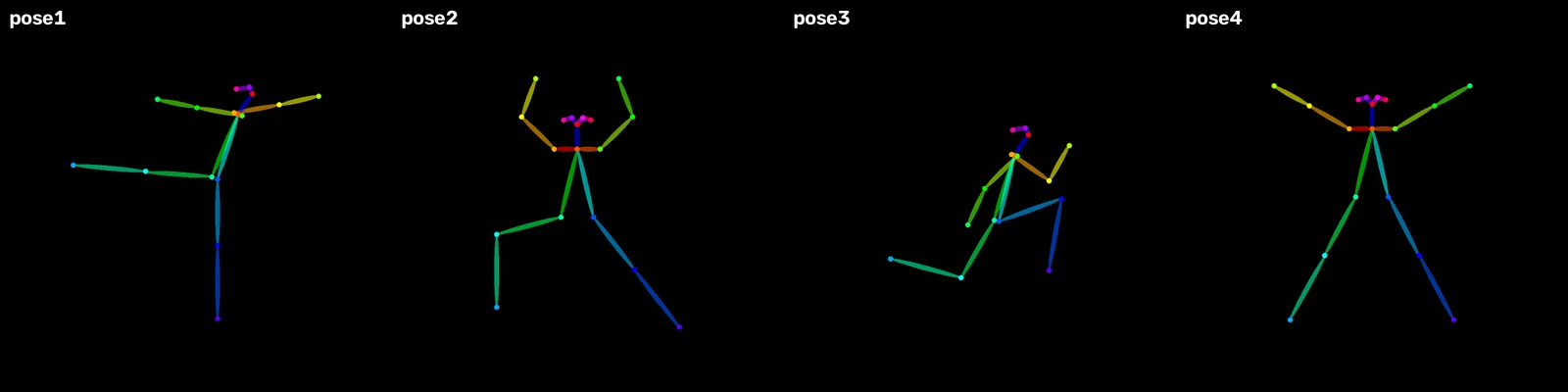
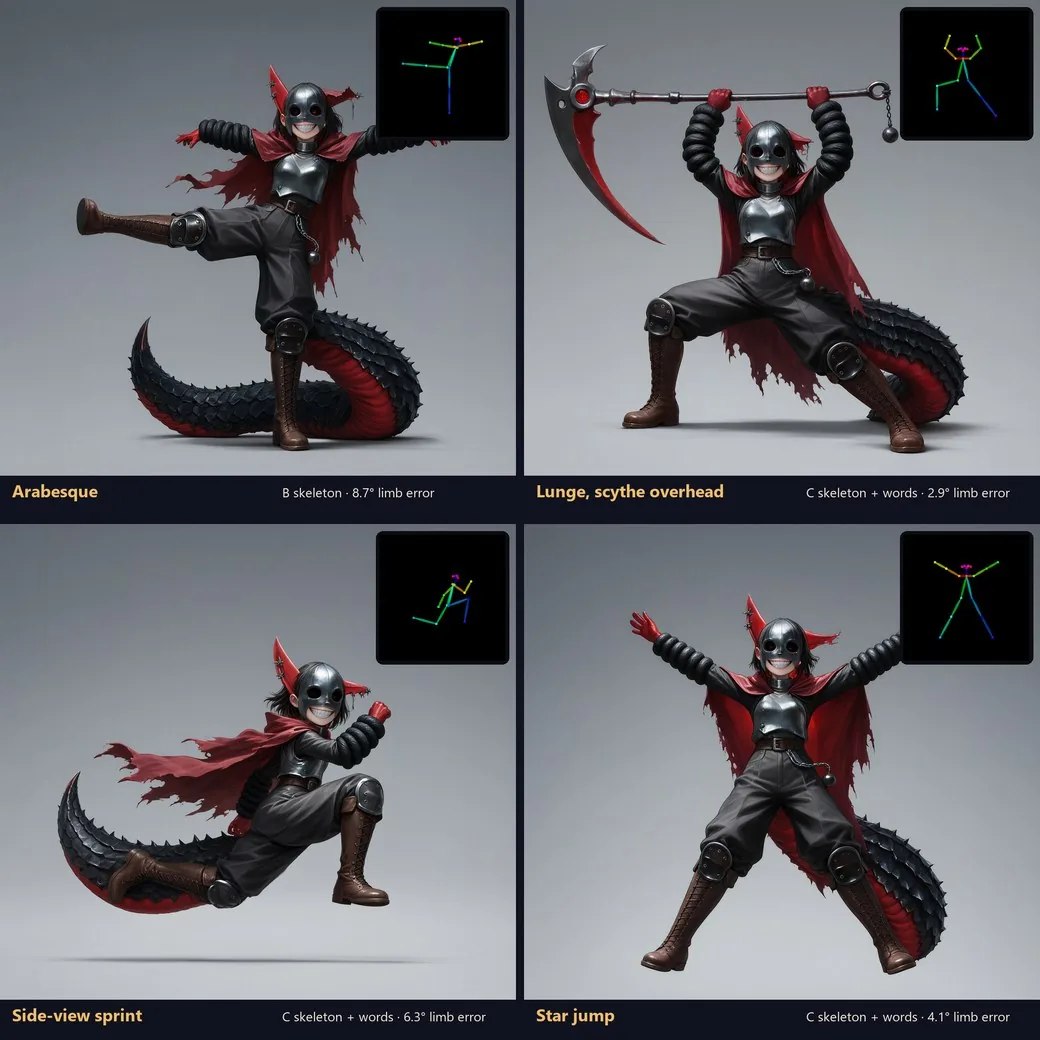
An arabesque and a sprint seen from the side, a deep lunge with her scythe overhead and a star jump, all far from how she stands in her reference pictures. Each was made three ways with the same seed:
- A, words only.
- B, stick figure only, with a line telling the editor to copy its pose.
- C, both.
The best picture of each pose
All 12, scored
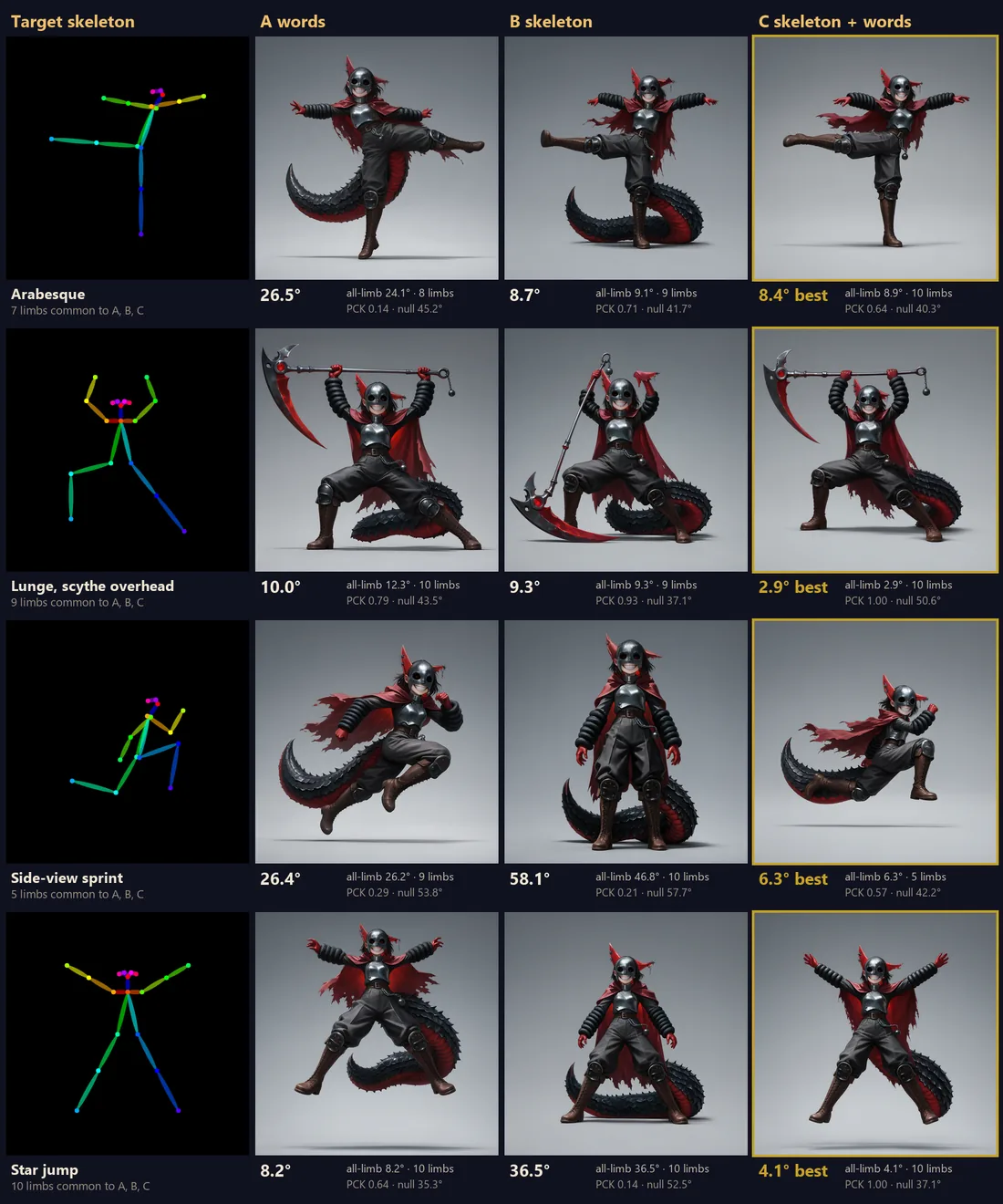
The big number is how far off her limbs are in degrees, over the limbs found in all three versions of that pose. “null” is the picture scored against the other three stick figures, 35 to 58 degrees, so every picture was closest to its own.
| Pose | A, words | B, stick figure | C, both |
|---|---|---|---|
| Arabesque | 26.5 | 8.7 | 8.4 |
| Lunge, scythe overhead | 10.0 | 9.3 | 2.9 |
| Side-view sprint | 26.4 | 58.1 | 6.3 |
| Star jump | 8.2 | 36.5 | 4.1 |
| Average | 17.8 | 28.1 | 5.4 |
Words alone did well on the two poses facing the viewer and drifted on the side views. The stick figure alone lost where it is hard to read. In the sprint the editor copied her standing pose, and in the star jump it left her arms hanging.
What OpenPose saw
OpenPose is a free model that finds a person’s joints. The stick figures use its colours, and it scored every picture.
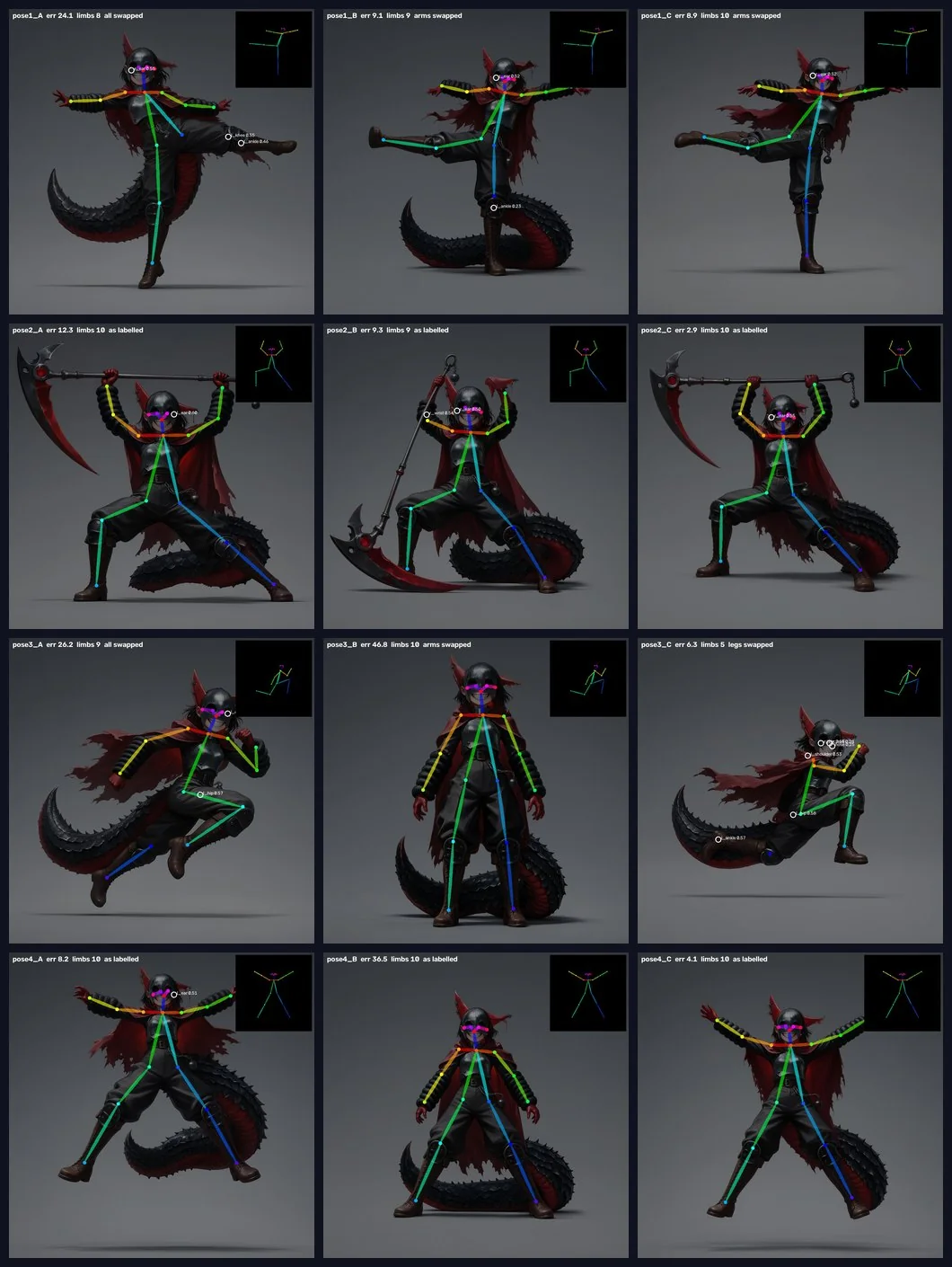
It struggles with side views. In the sprint with both it found 8 of her 14 joints. It also picks left and right separately for the arms and the legs, so each picture is scored four ways and keeps the best. That rule was changed after the first test picture. Under the first rule, swap all or nothing, the result is mixed: 16.9 degrees for both against 17.0 for words.
What went wrong in the stills
- One seed per picture. The sprint with both, run again at a second seed, came out at 4.5 degrees.
- Side views came back facing the viewer.
- The arabesque with both has no tail, and in the lunge with the stick figure alone she holds the torn tip of her ear like a rag.
Her tail in the stick figure
Her tail is as big as she is, and OpenPose has no joints for it. So the second run drew it in as a gold chain of six joints tapering from her lower back, with one more sentence in the prompt. Four new poses were each made from the body-only stick figure and from the one with the chain, same seed. SAM 3.1, a free model that cuts out whatever you name, found each tail, and the agent measured how far it ran from the chain.
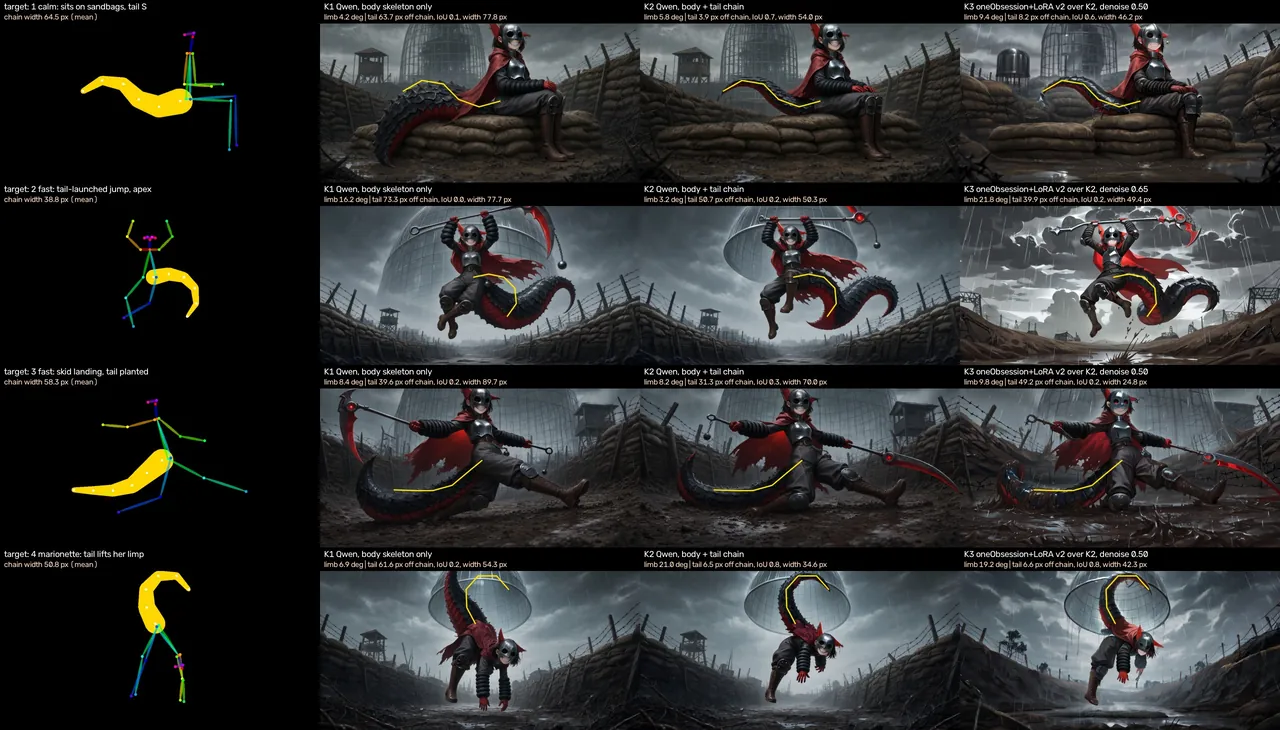
| Pose | Body only | With the tail chain |
|---|---|---|
| Sitting, tail in an S | 63.7 | 3.9 |
| Jump attack | 73.3 | 50.7 |
| Skid landing | 39.6 | 31.3 |
| Lifted by the tail | 61.6 | 6.5 |
With the chain her tail took the drawn path in the sit and the lift. In the jump the editor drew her bigger than the stick figure, and in the skid the tail lay flat behind her either way. With the chain it also came out thinner every time.
A repaint with a model that knows her
Qwen-Image 2.1 only knows her from reference pictures, so each chain picture was repainted with an anime model and a LoRA trained on Jefrie, a small add-on file that teaches a model one character. Of three strengths, the agent kept the strongest that moved her limbs 3 degrees or less.
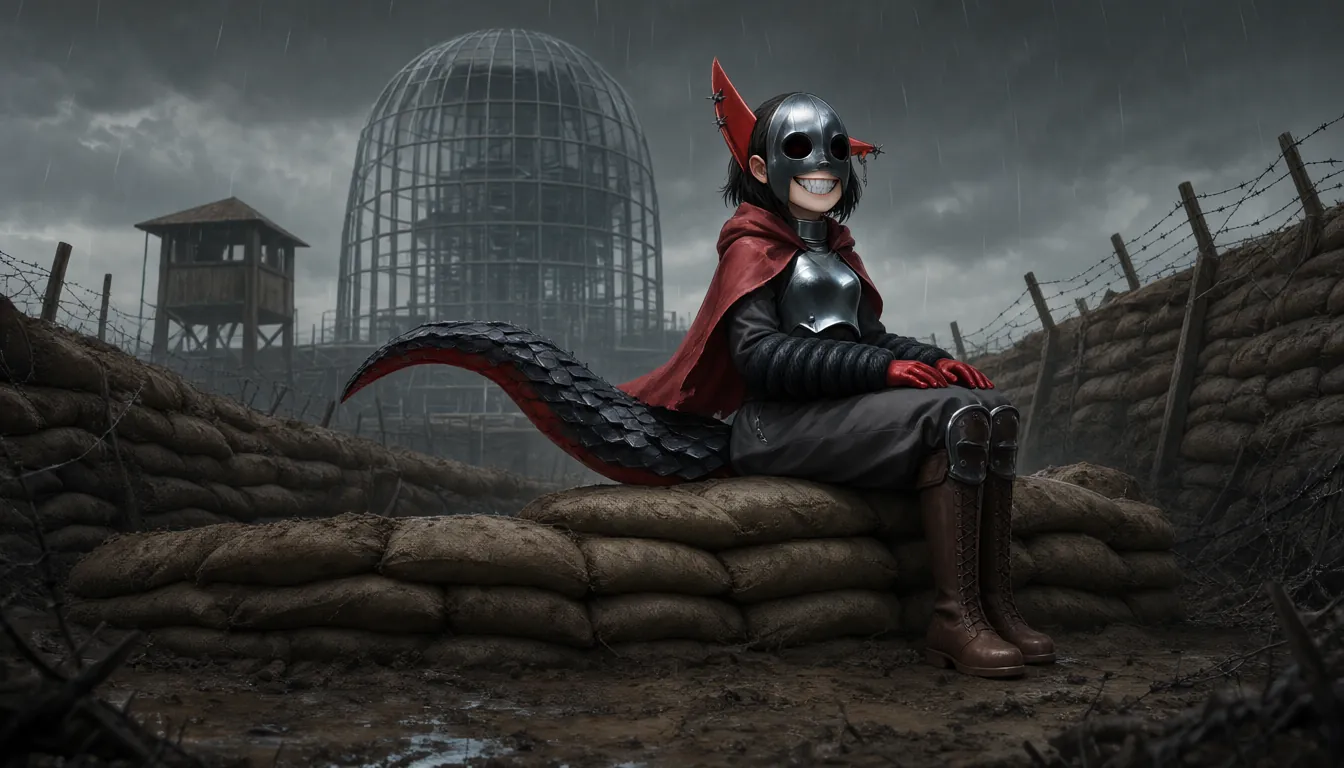
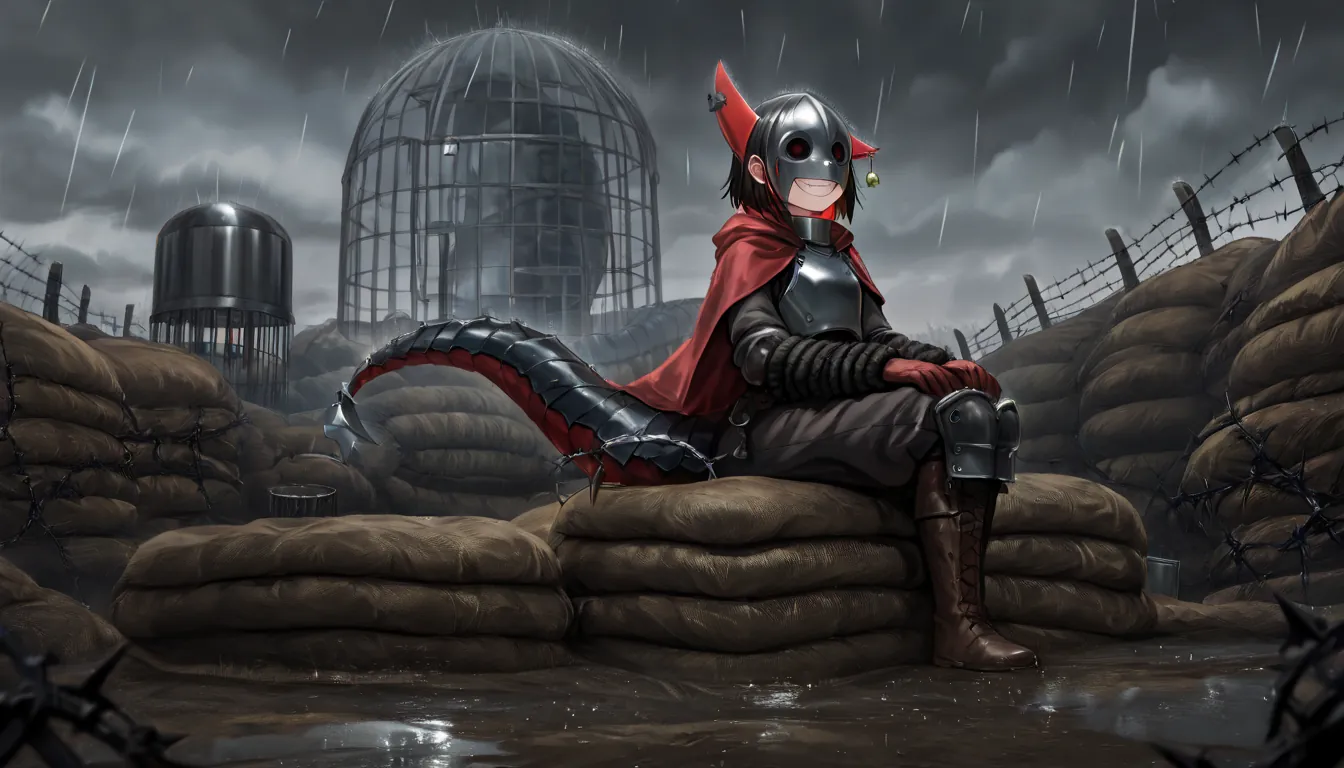
In all four it kept her mask, ear points, gloves and knee guards and turned her grin into a closed or thin-lipped smile. In the jump it also added steel pylons on the horizon.
One picture as a video’s keyframe
MiniMax-H3, a video model that also makes the sound, can take a picture as a guide at any frame. Each repaint went in as the only guide, at one frame of a five-second clip with no first or last frame, and the prompt was timed to reach the pose there. The same seed and prompt ran again without it.
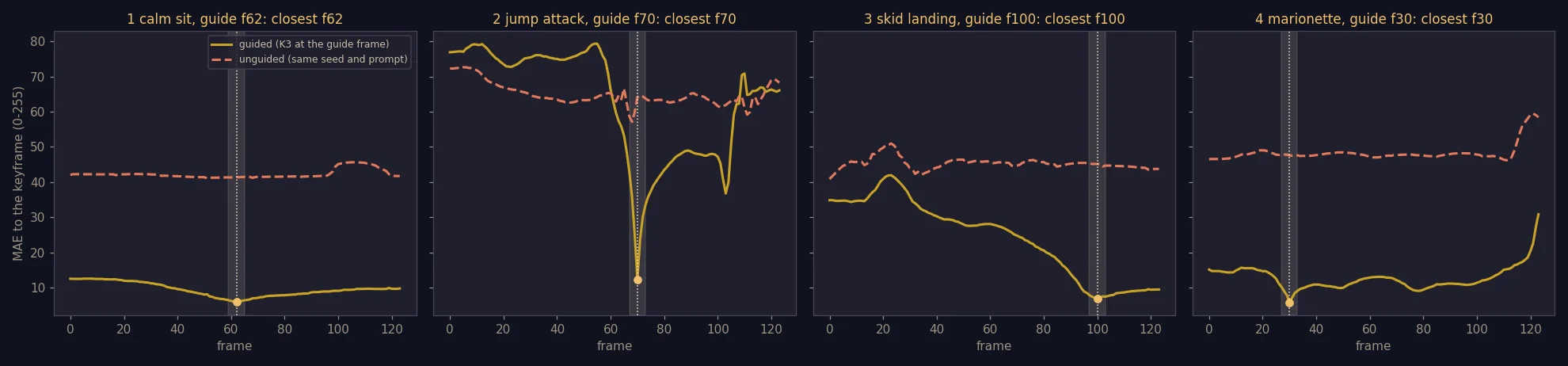
With the keyframe, the closest frame was the one asked for in all four. The guide also set the whole clip. Each guided clip was in the keyframe’s scene from its first frame, while without it the same seed drew a white skull-like mask in three clips. How long she held the pose followed the prompt: about one frame in the fast jump, and from frame 85 to the end in the skid.
Every number of the second run, pose by pose
| Sitting | Jump attack | Skid landing | Lifted | |
|---|---|---|---|---|
| Tail off the chain, body only → with chain (px) | 63.7 → 3.9 | 73.3 → 50.7 | 39.6 → 31.3 | 61.6 → 6.5 |
| Tail overlap with the chain, body only → with chain | 0.10 → 0.66 | 0.04 → 0.15 | 0.20 → 0.25 | 0.25 → 0.80 |
| Tail width, body only / with chain / drawn (px) | 78 / 54 / 64.5 | 78 / 50 / 38.8 | 90 / 70 / 58.3 | 54 / 35 / 50.8 |
| Repaint strength kept | 0.50 | 0.65 | 0.50 | 0.50 |
| Its limb change from the chain picture, common limbs | +0.6° | +0.9° | +0.1° | −2.0° |
| Closest frame to the keyframe (asked) | 62 (62) | 70 (70) | 100 (100) | 30 (30) |
| Pixel difference there, with / without the keyframe | 5.96 / 41.4 | 12.4 / 64.1 | 6.9 / 45.2 | 5.9 / 47.6 |
| Limb error at that frame, with / without (°) | 3.8 / 16.3 | 28.6 / none found | 9.2 / 49.1 | 20.7 / none found |
The overlap is intersection over union of the tail’s cutout and the drawn chain’s band. The limb numbers for the lift are weak: OpenPose reads a body hanging head down poorly.
What went wrong with the tail and the video
- One seed per picture and per clip.
- The repaint rule changed after the first pose was scored. Under the first rule the jump would have got a lighter repaint, without the pylons, and the sit a stronger one.
- Side views came back facing the viewer in the sit and the skid.
- The lift ends off model. She flies at the camera with a blue glow at her collar.
The two sentences
If you only want the trick, this line went in after the description of the character, with the pose in words right after it.
Her pose is exactly the pose of the stick figure in <image2>: the same angle of every arm,
leg and her body, at the same place and size in the picture. <image2> is only a pose guide:
draw no lines, dots or stick figure in the picture.
And for a tail chain, this one.
The thick yellow tapering band in <image2> is the path of her tail: her tail grows exactly
along that band, as thick as it is, from its wide end at her lower back to its thin tip, in
her tail's own dark plates and red underbelly, never yellow.
Try it on your own character
You need Claude Code and ComfyUI. Use Claude Opus 5.5 at high effort, which ran both experiments. On my 8 GB laptop card the stills took 23 minutes and about 17 GB of model files. The tail and the video took 33 minutes more and about 46 GB more, plus a LoRA of your character for the repaint.
1. Set up. Paste this first. Parts: one is the stills. Write one and two to add the tail
and the video.
Parts: one
Get this computer ready to rerun the experiment in
https://aaronorelup.com/ledger/stick-figure-poses/notes.md
ComfyUI is already installed. Install only what's missing, test each piece once,
then tell me what you installed and where.
2. Run it. Put a picture of your character on the first line and the same parts on the second. Use the third for anything you want done differently, like your own model or poses, or leave it to match my test.
My character: C:\path\to\your-character.png
Parts: one
Change: nothing

Rerun the experiment in
https://aaronorelup.com/ledger/stick-figure-poses/notes.md
with my character, on my own setup where it fits. Keep the stick figures and the
versions so my scores compare with the post. Show me the sheets and clips the post
shows when it's done.
Both prompts point to the notes page, the recipe: the stick figures, the models and settings, the prompts, and the scripts that score the results.
Claude agents designed and ran both experiments on my laptop, and Claude wrote this post from their notes.