I tested the AI rigging and animation models on Jefrie. The scripted rig won.
Claude installed SkinTokens, UniRig and UniMate in a separate ComfyUI, ran them on the same 3,000-triangle Jefrie as the rig it had built by script, and measured the same poses and clips side by side. SkinTokens skins her body about as well as the script but ties her cape to her legs, UniRig was the only one to try a tail and her mesh tore, and UniMate's clips don't loop: her feet never touch the floor in four of the five, and in the jump, fall and grind her tail sinks through it. What each one is, how to install them without breaking your ComfyUI, and when I'd reach for which.
Update, 8 October: I tested them properly
The scripted rig still wins on Jefrie, but the AI tools are better than this post made them look. I asked Claude to find out when they’re worth using. It ran 17 more experiments, each re-checked by a verifier agent, on Jefrie, Mixamo’s X Bot, an adult diver and BloodTailor, then tested UniMate’s newest release. Nothing AI-made went into Unity or the game this time either.
- For the two riggers, it was mostly the tail and the cape. They were 84.5% of the vertices that moved wrongly in SkinTokens’ auto-rig, and cutting the tail off the mesh removed 92 to 93% of UniRig’s.
- For UniMate, mostly not. The tail caused one of its six failures and half of another. The rest was our recipe and the model’s own limits.
- On the characters they were trained for, they’re good. SkinTokens matched an artist’s rig on the X Bot, and UniMate’s Mixamo-only model made believable runs and jumps on a Mixamo rig.
- UniMate v3 and its official preparation for new rigs, out on 5 October, didn’t change her result. Same skeleton, motion within seed-to-seed noise of the old model on the run and the jump, faster takes (27 to 39 s against 43 to 48), and 2 of 6 jumps that end in the air.
Corrected from the post below:
- Weld before UniRig: the welded mesh gave a worse body in 3 of 3 runs. That copy was also an OBJ with different normals, so welding itself isn’t proven to be the cause. Feed it as exported, then fix the seams.
- UniRig’s free-form template as a first guess at extra chains: in 7 of 7 runs, none ran along the tail.
- UniMate with the tail locked, to sketch an idle: she crouches, and the tail sits under the floor in 60 of 60 frames.
- “UniMate’s official preparation for new rigs isn’t out”: it is, see above.
- “The tail and the cape are where these tools break”: only for the riggers, and part of SkinTokens’ body error was one setting.
- FootLock finding nothing: that’s by design. It only pins feet already near the floor, and an in-place run has none.
- UniMate’s humanoid checkpoint, “not tried”: tried now, above.
What I’d do now:
- A plain humanoid, limbs apart, nothing hanging off it: SkinTokens’ auto-rig, then rename the fingers (21 of 30 were wrong on the X Bot).
- A skeleton you already have: SkinTokens skin-only with
use_postprocessoff. The ComfyUI pack turns it on, and on Jefrie that handed her pelvis, chest and forearms to the joint below them. In a wrist-only test, 123 of 185 forearm vertices moved with it on, 0 with it off. - Feed SkinTokens a denser copy (12,000 triangles) and map the weights back to the game mesh: a better body, no help for the cape.
- UniRig: rig a copy without the tail, then average the weights across each texture seam. The cracks went from 0.787 of her height to 0, in about a second. Those two were measured separately, not together: the averaging on the full mesh as exported, the tail-less runs on welded copies, which have no seams.
- UniMate, body only: no tail or cape bones, small end bones at the feet, hands and head, the mixamo normalisation, its exact training sentences and 3 seeds. On a Mixamo rig, its Mixamo-only model plus a constant height fix. Still non-commercial.
- The best hybrid: AI body weights, scripted tail and cape. SkinTokens’ body weights on our skeleton, with the script’s tail and cape weights, were worse than our rig on 1 of 50 checks across her five game clips and better on 2. That was the best of several runs, which vary: through the ComfyUI node the same settings gave 2 worse and 2 better, and none of the 39 weight sets passed the bar set before the test. That’s what I’d try first on a new character.
The rest of this post is the first test, as filed on 5 October.
None of the AI rigging or animation models beat the rig Claude built for Jefrie by script, so the scripted one stays in the game. The closest was SkinTokens, a small language model that writes bones and skin weights as tokens: handed our skeleton, it skins her body about as well as ours does, but it ties part of her cape to her legs. UniRig was the only tool that tried to give her a tail, and her mesh tore. UniMate, which animates any skeleton from a sentence, made clips that don’t loop. In four of the five her feet never touch the floor, and in the jump, fall and grind her tail sinks through it.
I asked for this on 4 October, the evening she first worked in Megabonk (that post): try the ComfyUI rigging and animation tools that run on specialized LLMs, and write a full report on them as a post of its own, compared against Claude’s own pipeline. Claude’s agents installed three of them in a second ComfyUI that couldn’t touch my real one, ran them on the exact 3,000-triangle mesh in her game build, and measured the same poses and the same five clips against the rig that’s in it. This is the report. If you only want to know which one to use, it’s the next table.
When I’d reach for which
| Tool | What it does | What it did to Jefrie | Reach for it when |
|---|---|---|---|
| SkinTokens, skin-only | Paints skin weights onto a skeleton you give it | Body about as good as ours, tail as clean as ours, cape tied to her legs. 10 seconds | You already have a skeleton and want a second opinion on the body weights |
| SkinTokens, auto-rig | Makes the skeleton and the weights | A standard humanoid with 24 finger bones and no tail. 703 tail vertices went to her left thigh | Your character is a plain humanoid: no tail, no cape, no wings |
| UniRig, free-form | Makes a skeleton of any shape, and the weights | The only one that proposed tail and cape bones. The mesh tore at its seams; welded first, it crumpled | You want a first guess at where extra chains go, and you’ll repaint the weights yourself |
| UniRig, humanoid | Fits a 52-bone humanoid template | Failed twice: it needs exactly 52 bones and found 44 | A normally proportioned human |
| UniMate | Turns a sentence into motion for a rigged skeleton | Two-second clips that don’t loop. Feet never touch the floor in 4 of 5 clips; tail through it in the jump, fall and grind | Sketching an idle or a gesture that a person then cleans up. Non-commercial only |
| Our script pipeline | Claude’s own Blender scripts | In her game build. Loops close exactly and the tail stays above the floor | A game character with a heavy tail, exact loops and rules you can check |
What these tools are
“Specialized LLMs” fits one of the three exactly.
- SkinTokens (also called TokenRig) treats rigging as text. It’s from VAST and Tsinghua (paper, February 2026; code). Its backbone is Qwen3-0.6B, a small language model, trained to write the skeleton and then the skin weights as one sequence of tokens instead of words. The weights are squeezed into a short vocabulary of “skin tokens” first, and the model was tuned with reinforcement learning on top. Its checkpoint carries its own trained weights, so only Qwen’s config and tokenizer get downloaded. Code and weights are MIT and not gated, and the two checkpoints are 1.62 GB. It runs two ways: invent the skeleton, or skin one you give it.
- UniRig is its predecessor, from the same team. An autoregressive transformer writes the skeleton as tokens, then a second network predicts the weights (paper, SIGGRAPH 2025; code). It has a free-form template for any creature and a 52-bone humanoid one. Its own README now points to SkinTokens. The weights are MIT; the ComfyUI pack is GPL-3.
- UniMate animates; it doesn’t rig. Princeton, Berkeley, MIT and NTU, SIGGRAPH Asia 2026 (code, paper). A frozen FLAN-T5 text encoder reads your sentence, and a 74-million-parameter flow-matching transformer generates the motion for any rigged skeleton with 5 to 70 joints. Every clip is 2 seconds, 60 frames at 30 fps. The code is MIT, but the weights were relicensed to CC BY-NC 4.0 on 1 October, so it’s fine for my free mod and not for anything sold. Prompts start with “An object”, whatever the subject is.
Two more were researched and skipped:
- Puppeteer (ByteDance Seed, Apache-2.0) is, by its competitors’ own tables, the best baseline skinner. It’s Linux-only, and WSL isn’t installed on my laptop. Turning that on is a Windows feature change, and that one’s mine to make, not an agent’s.
- AniGen makes a new rigged mesh from a single image. I already had the mesh, and it wants at least 18 GB of VRAM against my 8.
What they were up against
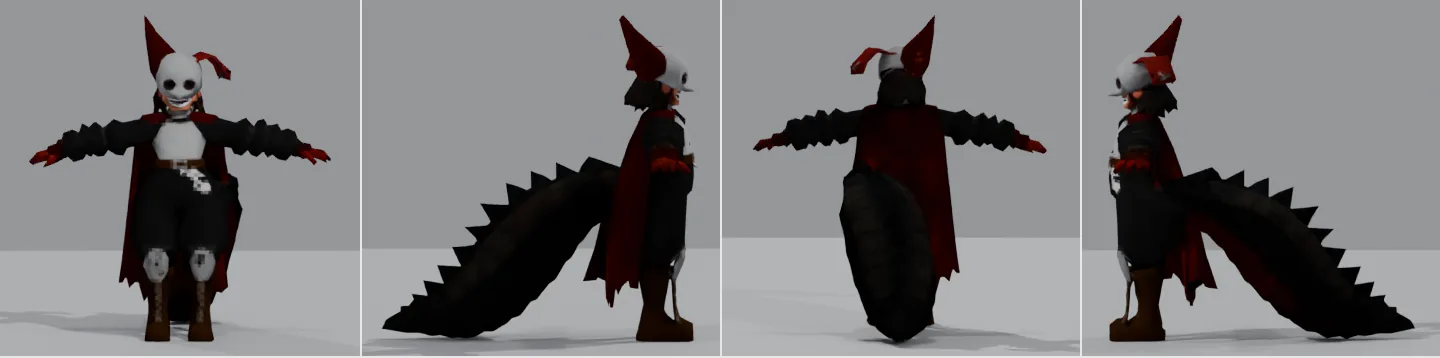
The rig in the game came from Claude’s own scripts, run headless in Blender on the CPU. The model had already been made: a Megabonk-style reference sheet, then TRELLIS.2 at its default of about 700,000 triangles (267 seconds on my GPU), then the Blender MCP crushed it to exactly 3,000 with a 3 mm voxel remesh and a Collapse (2.8 + 7.7 seconds). Asking TRELLIS for 3,000 triangles directly gave a fan of shards from her cape with no head, hands or tail, which is what my September notes predicted.
auto_rig_j.pyplaces the bones. Joints come from a JSON file Claude filled in by looking at grid renders of her, then Blender’s bone heat paints the first weights. It welds the mesh first, because a glTF round trip splits her into 3,874 vertices instead of 1,458 and an unwelded rig shatters at the seams.skin_fix_mb.pyfixes what bone heat gets wrong. On one welded shell, bone heat gave the root of her tail the middle of her cape. The second pass weights the 7-bone tail by distance along it, adds a 2-bone cape chain (Megabonk’s own Knight and Fox carry 3-bone ones), adds a bone for the scythe, and caps every vertex at 4 influences.make_clips.pywrites the five clips. Idle, Run, Jump, Fall and Grind are keyed in code; the tail is a verlet chain with gravity, friction and a floor. A bake takes 4 to 8 seconds with its checks, and a separate checker re-imports the FBX in a fresh Blender. The rules: each loop’s first frame equals its last on every vertex, Jump’s last frame is Fall’s first, no tail vertex goes more than 2 cm under the floor, no Euler flips, weights sum to 1.- Version 2 straightened her tail. After my playtest I asked for the tail to lie straight
behind her.
tail_repose.pyre-posed the rest pose and the weights stayed byte-identical; the whole fix took 54 minutes.
That took about three and a half hours of agent work for the first rig and clips. The same rig, before the tail fix, had already passed my own playtest. With the straight tail it’s the one running, jumping, grinding and fighting in Claude’s test runs in the game, in the modding post.
Installing them without touching my ComfyUI
My main ComfyUI runs everything else I make, so none of this went into it. Installed the normal
way, these packs put their requirements into ComfyUI’s own Python: UniMate needs transformers
5.x, and the UniRig pack’s README starts with a pip install --upgrade. Its own installer then
builds its environment from a third-party conda channel, pulls flash-attention wheels from the
pack author’s own wheel repository, and downloads re-uploaded weights instead of the official
ones.
So Claude built a second ComfyUI: the same release as mine (v0.37.0) in its own folder, with its own Python 3.11 environment, PyTorch 2.7.0 for CUDA 12.8, its own port, an offline model cache and its own temp folder. It came to 11.99 GB: 7.66 GB of Python environment, 1.64 GB for SkinTokens (its two checkpoints plus Qwen’s config and tokenizer), 2.60 GB for ComfyUI, the Python interpreter, the packs and the UniRig and UniMate weights, and about 0.09 GB of test outputs, caches and rounding.
The proof that my real one was untouched: its pip freeze was byte-identical before, during
and after (230 lines, same SHA256), and so were its list of installed packages with their
timestamps and its list of custom nodes.
It took about an hour and a half of agent time and five short GPU test runs on the packs’ own sample meshes, a generic human and a bird. On those, all three tools worked. The setup notes log 13 failures, leftovers and side effects on the way. The ones worth knowing if you try this:
- You don’t need flash-attention. The SkinTokens-NoBlender wrapper falls back to PyTorch’s own attention. It also leaves out the upstream helper server, which binds to every network interface and unpickles whatever it receives (two pull requests that bind it to localhost were still open on GitHub on 5 October).
- UniRig can load without its installer. Its dependencies came from PyPI, two small
pure-PyTorch stand-ins replaced
torch_scatterandtorch_cluster(they have no Windows wheels on PyPI), and the official checkpoints were converted to the format the pack expects. - Blender inside ComfyUI needs the main thread. UniRig calls Blender operators, ComfyUI runs
nodes on a worker thread, and the operators refused:
poll() failed, context is incorrect. The fix sends those calls to a child Python process. - Run UniRig in fp32. Its sparse-convolution library has no bfloat16 kernels, and “auto”
picks bfloat16 on my GPU:
KeyError: torch.bfloat16. - UniMate leaves 0.74 GB in your temp folder every session. It unpacks its model there and never cleans up if ComfyUI is stopped by killing it. Claude patched the pack to load from memory and proved the output byte-identical.
- Check what lands outside the folder.
uv python installwrote a launcher into~\.local\binand created a Python registry key, and Blender’s Python module made a settings folder in AppData. All three were found and undone. Next time:uv python install --no-bin --no-registry.
It’s still on my disk. Deleting the folder removes all of it; nothing outside it is needed.
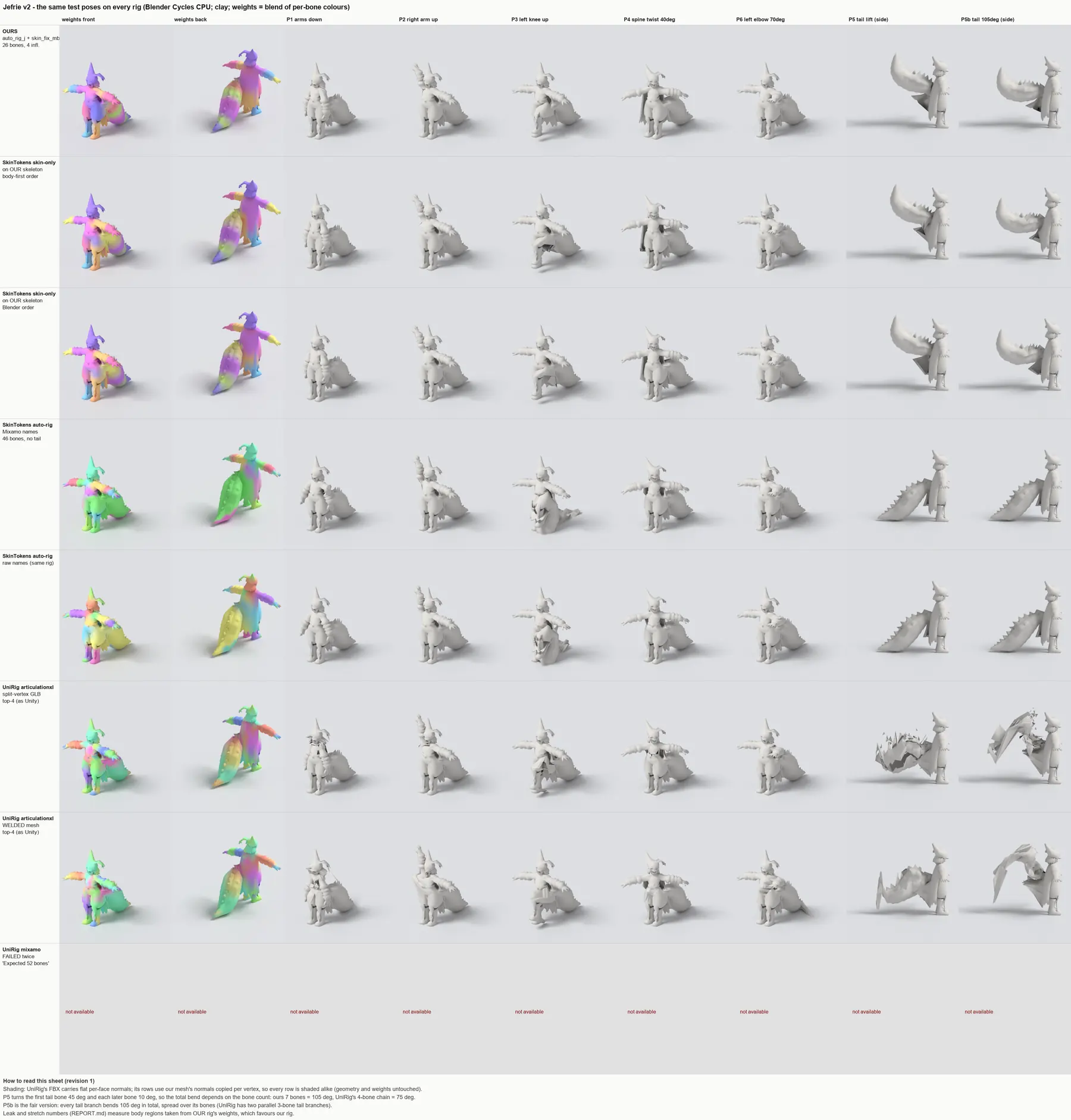
Test 1: the same seven poses on every rig
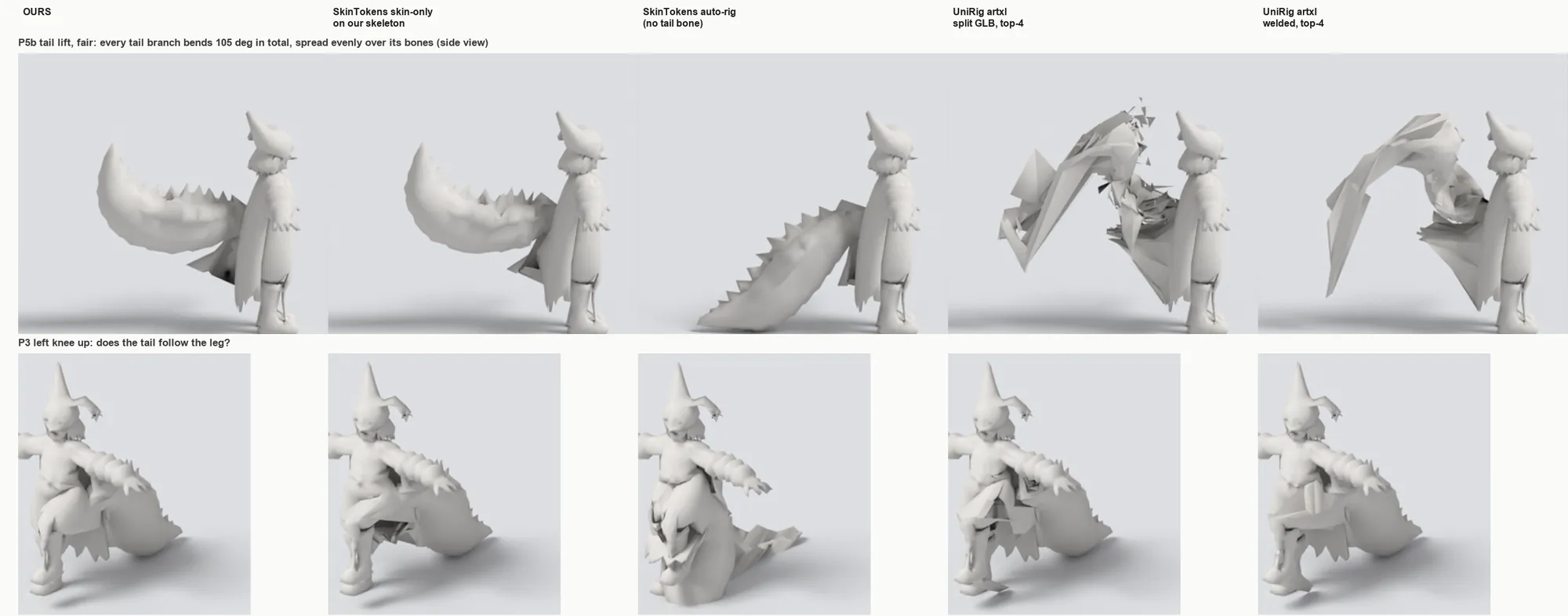
Each tool’s weights went onto the same mesh, and one script posed them all in Blender: arms down, right arm up, left knee up, a 40-degree spine twist, a 70-degree elbow, and two tail lifts. Three things were measured: leak, how far parts that should stay still move, as a fraction of her height; stretch, how much the most-stretched 1% of the mesh’s edges grow (1.0 is none); and cracks, how far the mesh splits apart. Only the 4 strongest weights per vertex were kept, because that’s what Unity keeps.
| Rig | Tail lifted 105° | Left knee up | Cracks | Bones, max weights per vertex |
|---|---|---|---|---|
| Ours | Clean (stretch 1.20) | Tail stays put (leak 0.000) | None | 26, 4 |
| SkinTokens on our skeleton | Clean (stretch 1.22) | Leak 0.018 | None | 26, 4 |
| SkinTokens auto-rig | No tail bone, nothing moves | Tail folds into the leg (leak 0.88, stretch 8.2) | None | 46, 4 |
| UniRig, as exported | Tears (cracks up to 0.80 of her height) | Leak 0.026 | 873 of 1,195 duplicate-vertex groups on the seams weighted differently | 44, 44 |
| UniRig, welded first | Crumples (stretch 4.5) | Leak 0.015 | None | 44, 44 |
- SkinTokens on our skeleton is the real contender. In the arm poses it leaks less than ours (0.003 to 0.007 against 0.030) and stretches a little more (up to 1.74 against 1.44). Its tail lift is as clean as ours, on the tail bones our skeleton gave it. Its cape isn’t: only 69 of the cape’s 232 vertices follow the two cape bones, while 89 follow her left shin or right foot and 58 follow the root of her tail. It never makes her chest or either forearm the main bone for any vertex, yet her elbow bends about like ours (the forearm moved 0.117 of her height against our 0.124), and ours actually pinches more at the crease.
- SkinTokens on its own makes a standard human. 46 bones, 24 of them fingers for her mitten hands. No tail and no cape, so 703 tail vertices and most of the cape went to her left thigh. Raise that knee and the tail comes with it.
- UniRig’s tail is two parallel 3-bone branches hanging off its hip bone. Its cape got bones too, which nothing else proposed. But a glTF export duplicates vertices along texture seams, UniRig weighted each copy on its own, and 873 of the 1,195 duplicate groups disagree, so the mesh splits into shards. Welded first, it no longer tears, but up to 44 bones pull on a single vertex (Unity keeps 4), some vertices’ weights add up to only 0.11, and the lifted tail folds into a crumpled sheet. It also lifts further than ours, 0.38 to 0.42 of her height against 0.28, but that number counts torn and folded triangles, not a clean lift.
The first version of this report was unfair to the AI tools. A verifier agent sent it back, and the fixes found more. The first tail lift bent UniRig’s 4-bone chain only 75 degrees against our 105, and the chain it picked mixed its two tail branches. UniRig’s renders looked faceted because its FBX carries flat normals, not because of the deformation. A “soft elbows” complaint about SkinTokens wasn’t supported by the numbers. The 11.99 GB install had been charged to SkinTokens alone. Every one of those corrections went the same way. It’s one run, but that’s the direction I’ll watch for whenever an agent grades its own pipeline against someone else’s. One bias is still in the table: the body regions used to measure leak come from our rig’s weights, which gives ours a home advantage.
Test 2: five clips, UniMate against the script
UniMate got our rig and five sentences: “An object stands in place, breathing and swaying gently”, “runs in place”, “jumps up in place and lands”, “falls through the air with its arms raised”, and “crouches low in place with its arms spread out for balance”. Each clip took 42 to 83 seconds and about 1.2 GB of VRAM. A script then tracked the lowest foot and the lowest tail vertex in every frame, and how far each clip’s last frame lands from its first. Heights are in centimetres on her 95 cm working scale.
| Clip | Ours: loop gap | UniMate: loop gap | UniMate: lowest foot | UniMate: lowest tail |
|---|---|---|---|---|
| Run | 0 | 6.6 cm | 2.5 cm up, never touches | 11 cm up at the lowest; through her legs in 12.5% of frames |
| Idle | 0 (the full 3 s loop) | 8.2 cm | 2.3 cm under | 2.9 cm under |
| Jump | not a loop | 53 cm | 6.7 cm up at the lowest, 9 cm at the end | 17 cm under the floor from 1.1 s on |
| Fall | 0 | 99 cm | 11 cm up at the lowest, 14 cm at the end | 18 cm under |
| Grind | 0 | 14 cm | 4.3 cm up | 10 cm under, in 29 of 48 frames |
- In our run, her feet never sink more than 0.3 cm under the floor, and they touch it on every stride. UniMate’s run never touches it at all.
- In the jump, fall and grind, UniMate’s tail goes through the floor while her feet float. The idle’s 2 to 3 cm under the floor is noise: passing our own run through UniMate’s encoder and back, with no generation at all, already moves her feet from 0.3 cm to 3.8 cm under.
- “Jumps up in place and lands” starts in the air. Her feet are 71 cm up in the first frame. Her canon says the tail does the work when she jumps: it rears up and slams down to launch her. A sentence that has to start with “An object” can’t say that, and UniMate’s name cleaner calls all seven tail bones “Tail”.
- The idle turns her 29 degrees. Megabonk turns the character itself; a clip shouldn’t.
- Our grind floats too, for a reason. In her game build she rides her scythe along the rail (Claude’s interpretation of a grind, not canon), and the scythe bone was taken out for these tests, so her feet hover where the scythe would be.
Claude tried three ways to make UniMate’s output fit a game:
- Locking the tail to our keys removes the tail-through-the-legs frames in the run. In the idle, the locked tail sits lower instead, 8.6 cm under the floor at worst.
- In-betweening the first and last frames cuts the run’s loop gap from 6.6 to 4.0 cm. It doesn’t close it.
- FootLock did nothing. Its output was byte-identical to the plain run, and its own metadata lists no foot contacts. Why it found none, the log doesn’t say.
On the SkinTokens rig, where the tail belongs to her thigh, the tail flaps with the leg and sinks 37 to 41 cm into the floor.
What failed, and why
- UniRig’s humanoid template needs exactly 52 bones. It found 44 on her, then 41 on the welded
mesh, and stopped with
Expected 52 bones for cls=vroid, got 44 bones. On the generic sample human it worked. A chibi with mitten hands and a tail isn’t that shape. - UniRig’s tearing is a seam problem. Weld the mesh before you feed it, as our pipeline does, and the tearing stops. The weights are still messy.
- SkinTokens drops what a humanoid doesn’t have. On bipeds its auto-rig emits a fixed human template. Someone reported the same thing upstream for capes, skirts and hair.
- UniMate’s first 12 jobs all failed, each within 1.5 to 3.1 seconds, and all 12 with the
same error:
ValueError: Unsupported glTF extensions. Blender’s glTF export writes a material extension (KHR_materials_specular), and UniMate’s validator rejects any extension. Re-validating afterwards found a second rejection: the scale channel Blender writes on every bone. A small cleaner removes both. - UniMate’s official preparation for new rigs isn’t out. On 4 October the maintainer wrote that it was “coming today”. When I checked on the 5th, nothing new was on GitHub or Hugging Face, so the ComfyUI pack’s own conditioning from the rest pose was used. This is the one result most likely to change.
The verdict, for a 3,000-triangle chibi with a heavy tail and a cape
Keep the script. The tail and the cape are where these tools break, and on Jefrie they’re most of her outline. The one tool that handled her tail, SkinTokens, only did it on the tail bones our skeleton already had. The script was written for her: an agent looked at her and wrote down where her tail goes, and every bake checks the rules the game needs.
What I’d still use them for, none of which has been tried in the game:
- SkinTokens on my own skeleton, as a second opinion on the body weights only, keeping the script’s tail and cape.
- UniRig’s free-form template on a welded mesh, as a first guess at where extra chains go on a creature I haven’t rigged before.
- UniMate with the tail locked, to sketch an idle or a gesture that I then clean up by hand.
What would change the verdict: UniMate’s preparation for new rigs, a UniRig humanoid template that takes a 41-to-44-bone chibi, or Puppeteer, if I ever turn WSL on.
Not tested
- Nothing from the AI tools went into Unity or the game. The 4-weights cut imitates Unity’s import, in Blender.
- UniMate got one seed per clip, two for the run. Its humanoid checkpoint and its other modes weren’t tried, and neither were Make-It-Animatable, Puppeteer or UniRig’s separate skeleton and skin nodes.
- The poses are proxies, judged on 360-pixel tiles and 2-second clips, and the leak regions favour our rig.
What it took
- Installing: about an hour and a half of agent time, 11.99 GB, and about 21 minutes of GPU for five test runs.
- Testing: 20 minutes of GPU in three bursts, each started only when no other job was using it or waiting for it. Everything else ran in Blender on the CPU, and the corrections took about 20 minutes more.
- Our own rig: about three and a half hours of agent work the first time, 54 minutes for the straight tail, and seconds to rebuild after any change.
- Money: nothing beyond my laptop. No cloud services.
In September it took six days to get her into 3D at all. This time each AI tool answered in about a minute, and the answers kept describing someone else: a person with no tail, or a tail that belongs to a thigh. Her tail weighs more than she does. So far the only way to tell a rig that is to write it down.