Modding Megabonk: a new character takes no code, a new mechanic takes a plugin
Claude's agents put my character Jefrie into Megabonk with her own model, five animations, an icon, a scythe built on the game's own melee attack and a renamed passive, all through the community loader and without a line of code. A jump the game doesn't have took a 241-line BepInEx plugin; in Claude's test runs it sent her 5.77 m up, against 3.70 m for a normal jump. How to do it yourself, what's easy and what isn't, how to keep modded runs off the leaderboards, and what I'd try next.
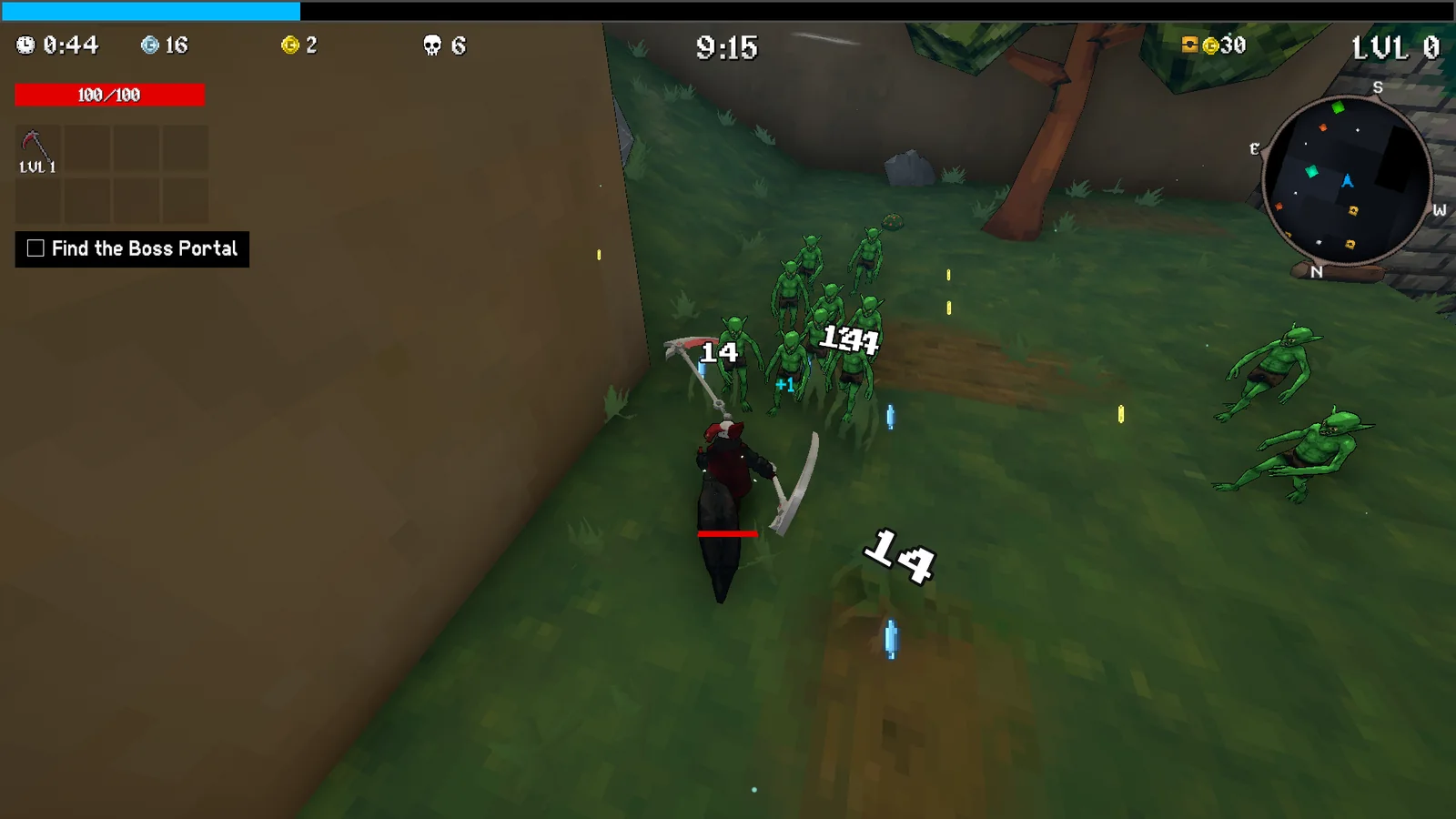
Megabonk takes a whole new playable character without a single line of code. Jefrie, my grinning scythe girl with a tail heavier than she is, is in a lab copy of my game now: her own 3,000-triangle model, five animations, a pixel icon, a scythe weapon and a passive, all loaded by the community’s character loader. I played her on 4 October, and she works. On the 5th Claude played the second version itself in three short scripted runs: she runs, jumps, falls, grinds a rail the harness spawned and set her on, and cuts down goblins with her scythe.
The limit is new behaviour. A custom character can only reuse what Megabonk already has: its attack classes, its passives, its stats. When I wanted something the game doesn’t do, a first jump launched by her tail, that took a BepInEx plugin: 241 lines of C# that hook the game’s own jump. In the game, on flat ground, starting with no upward or downward speed (she was running), it sends her 5.77 m up, against 3.70 m for the same jump without it. So no, you’re not stuck with the game’s existing mechanics. New ones are possible, but they’re a different kind of mod, and you have to read the game’s code to write one.
I didn’t write any of it. Claude’s agents did, in parallel tracks over about 16 hours for the first version and one more evening for the second, and my part was saying what I wanted and playing the result. This post is what they found out: how to do it yourself, what’s easy and what isn’t, how to keep a modded run off Steam’s leaderboards, the traps, and what I’d try next.
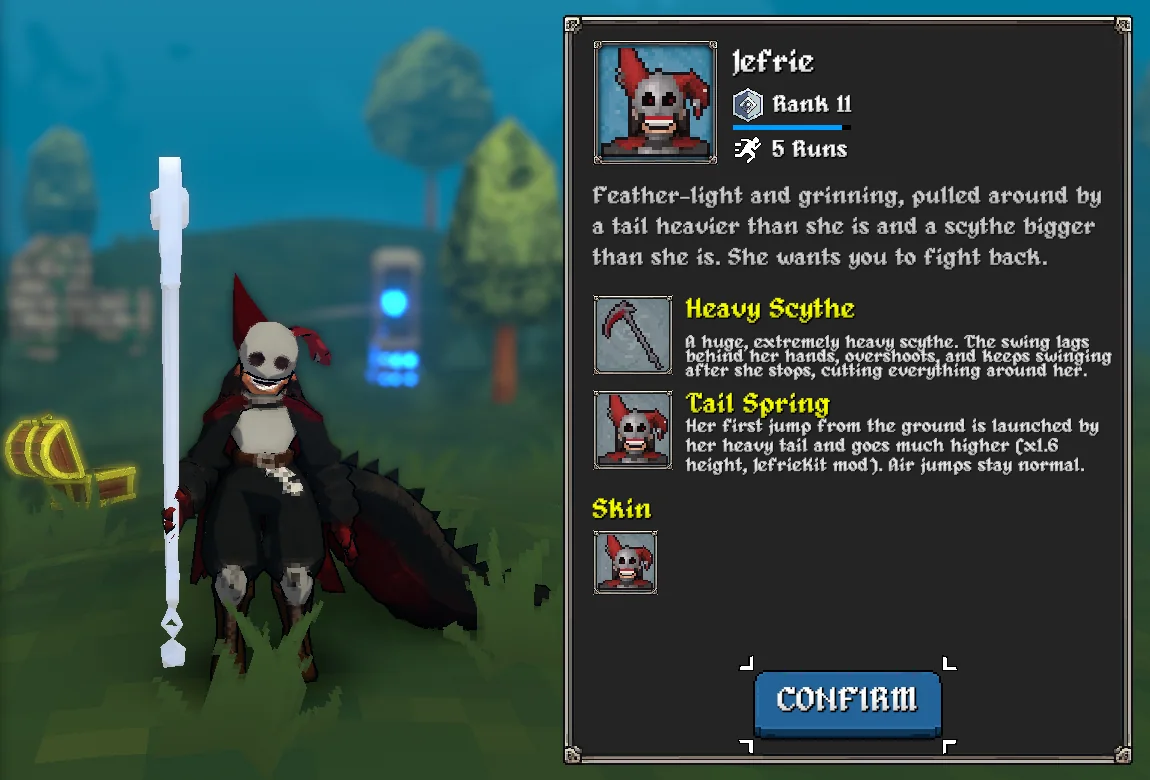
Where it stands on 5 October. Version 1 passed my own playtest. Version 2 lays her tail straight behind her instead of curled to one side, and swaps a passive that didn’t make sense for a tail-powered jump. In Claude’s scripted runs in the lab copy it passed every check on the third try. The first two failed on problems in the test harness: a stuck jump button, and a jump check that averaged in a downhill jump. My own playtest of it is next. Nothing is in my real Steam install yet. That happens once, after version 2 passes my playtest.
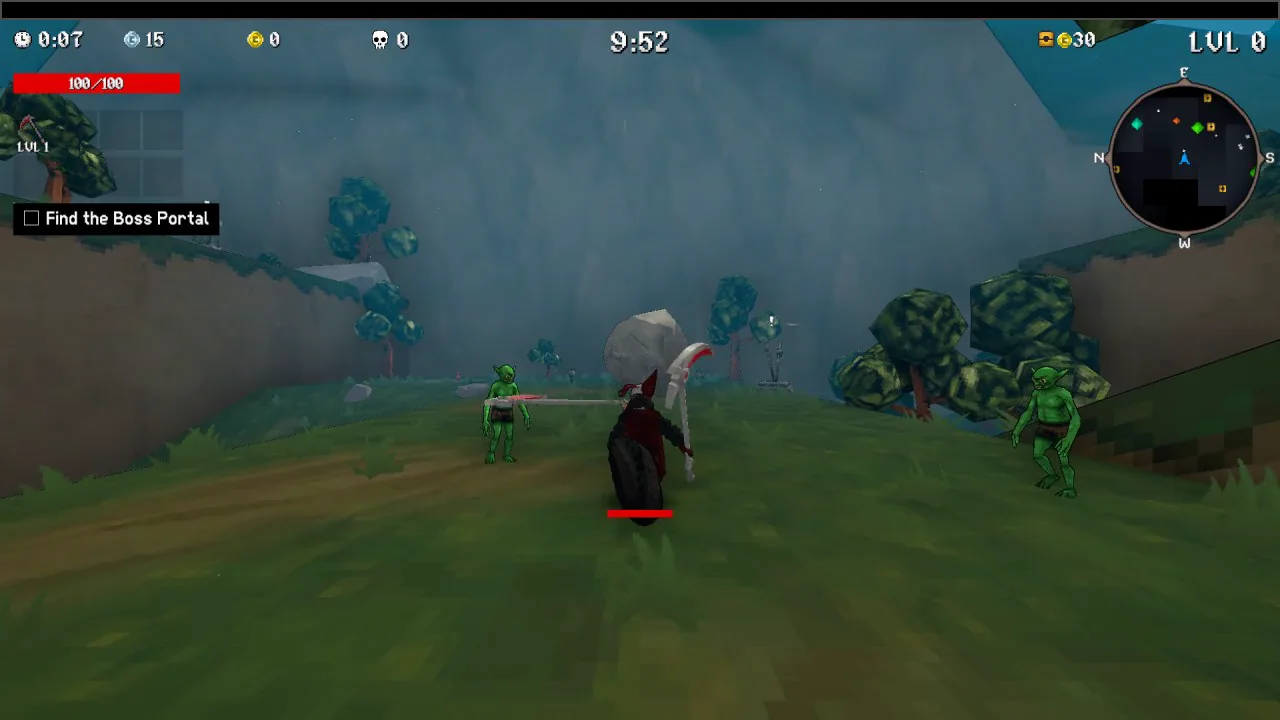
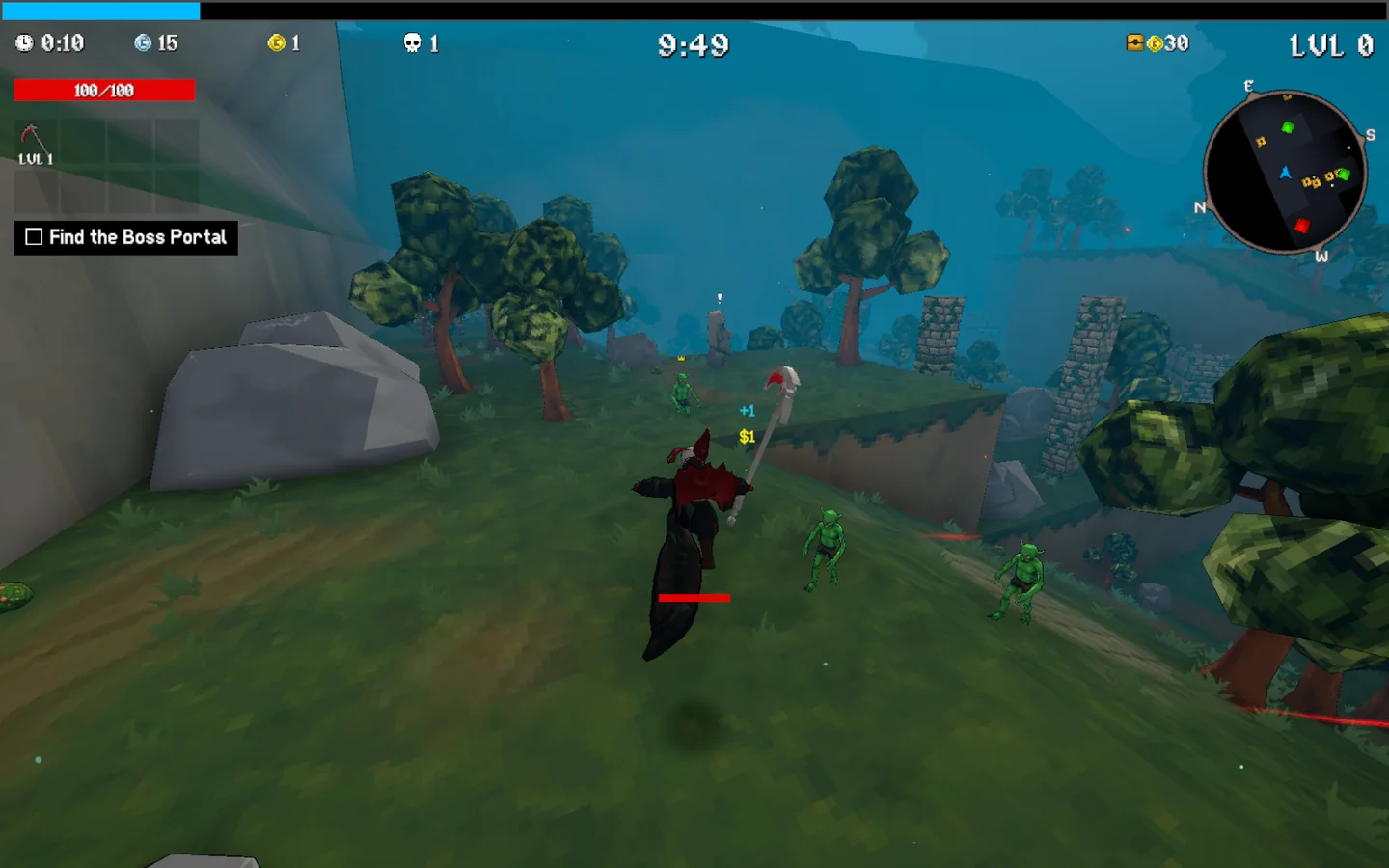
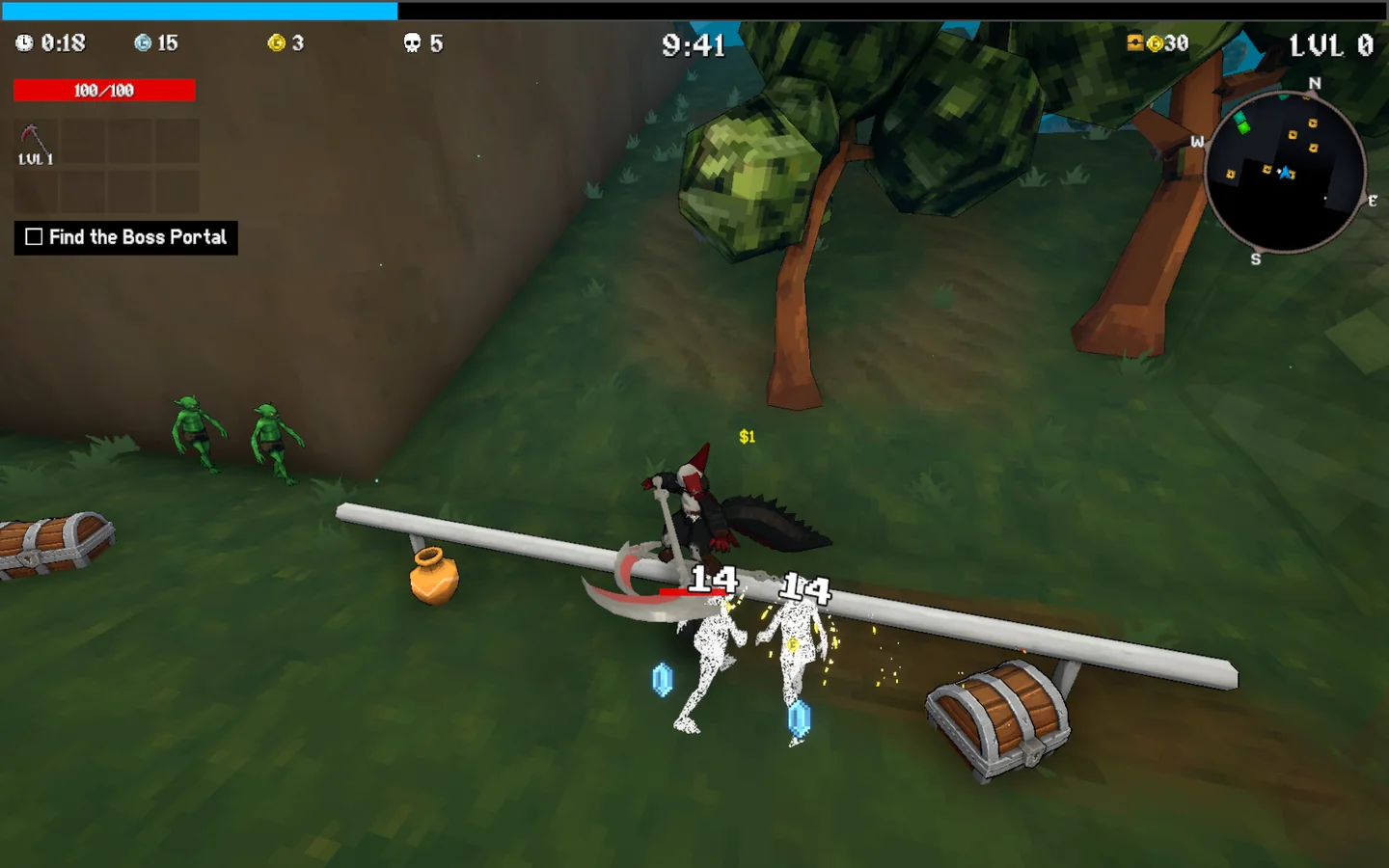
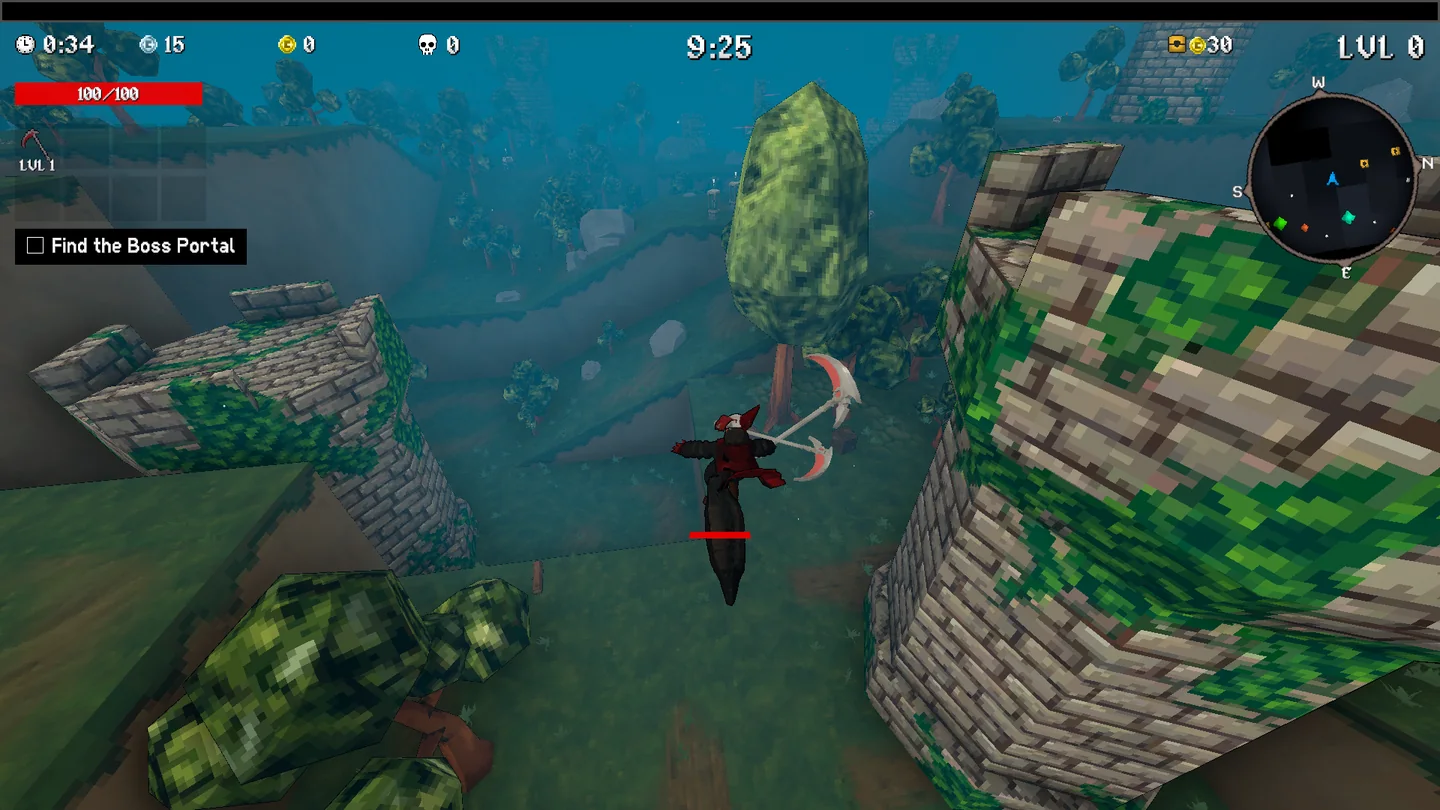
Every screenshot here comes from those three runs, on my laptop’s integrated GPU, captured from outside the game. Run 1 had no grind at all: a bug in the harness threw her off the rail (it’s in the traps below), and runs 2 and 3 had it fixed.
Easy, hard, and not with the loader
| What you want to change | How hard | How |
|---|---|---|
| A new playable character | Easy | A model with any armature and five animation clips, built into an AssetBundle with the maker project |
| A skin for a character | Easy | The same tools. The maker ships two example skins |
| Name, description, icons | Easy | Fields in the character’s data, written to its .custom.json |
| Starting stats | Easy | Stat modifiers in the json, using the game’s own 57 stats |
| A weapon | Medium | Your own prefab, timing and effects on top of one of the game’s projectile classes |
| A passive | Rename only | It must be one of the game’s 21 passives (or None), under your own name, text and icon |
| A base-game weapon as her starting weapon | Not with the loader | The json can’t point at one. A plugin could |
| New behaviour: a new projectile, a new passive effect, new movement | Not with the loader | It needs a plugin |
| Online play, anti-cheat, leaderboard checks | Don’t |
The line falls there because Megabonk is an IL2CPP game. Its C# was compiled to native machine
code, the GameAssembly.dll in the game folder. An AssetBundle carries data: meshes, textures,
animation clips, and references to scripts the game already contains. It can’t carry new code,
and the game has no way to run any. So a custom weapon is a prefab that says “use the game’s melee
projectile, with these numbers”, and a custom passive is one of the game’s passives under a new
name.
A plugin is different. BepInEx loads your own compiled DLL into the game when it starts, and HarmonyX lets that DLL run code before or after any of the game’s methods. That’s how you add a mechanic. The catch is that you need the game’s method names and what they actually do, and an IL2CPP game doesn’t ship them in readable form. That part is further down.
Jefrie’s kit, as it stands:
- Heavy Scythe. The game’s own melee projectile class inside our prefab, with a 0.98-second swing that starts slow, overshoots and swings back. It’s Claude’s reading of her canon line “It lags behind her hands, overshoots, keeps swinging after she stops”, and it’s labelled an interpretation. 14 damage, against 11 for Sonic’s ring. A thrown-scythe version built on the basic projectile class (the one the Sonic mod uses) was ready in case the melee class did nothing in game. It wasn’t needed: in Claude’s three runs the sweep landed 14 to 18 hits a run. Runs 1 and 2 ended with 18 and 15 kills on the scythe alone.
- Marionette Tail (version 1) was the game’s Float passive, renamed. It worked: hold jump in the air and she drifts down. It just didn’t make sense. Floating isn’t what her tail does. Her canon says the tail does the work when she jumps: it rears up and slams down to launch her.
- Tail Spring (version 2). The passive slot is set to the game’s None passive, which does nothing, with a new name and text on it. The effect lives in a plugin, below.
How to add a character
What you need
| Tool | Version | Why this one |
|---|---|---|
| Megabonk | build 21750826 (“version 1.0.69” in game) | Unity 2023.2.22f1, IL2CPP, 64-bit |
| BepInExPack_IL2CPP | 6.0.738 | Not the newest (6.0.755). Every Megabonk character mod pins 6.0.738 |
| CustomCharacterCreator, Shadowth117’s fix | 1.4.1 | The original 1.4.0 has been broken since the game’s December 2025 update (its GitHub issue #2; the fix PR #4 isn’t merged). Current character mods depend on the fix |
| A known-good character | SkeletonCrew’s Sonic 1.0.2 | Proves the loader works on your build before you build anything |
| MEGABONK_CustomCharacterMaker | GitHub | The Unity side: character data, weapon templates, the build menu |
| Unity Editor | exactly 2023.2.22f1, built-in render pipeline, plus com.unity.nuget.newtonsoft-json | The bundle has to match the game’s engine version |
| Blender | any recent one (we used 5.2) | Rig, animate, export FBX |
| Cpp2IL | 2022.1.0-pre-release.21 | Plugins only. The game’s metadata is version 29, newer than the stable release reads |
| AssetRipper | 2.0.0 | Only to measure the game’s own characters, locally |
Every mod package comes from Thunderstore and installs by hand: unzip, copy. No mod manager needed.
The steps
- Copy the game and back up your saves first. The safety section below explains why a copy isn’t as separate as it looks.
- Install BepInEx and the loader into the copy. The contents of the BepInExPack zip go in
the game’s root folder, the loader in
BepInEx\plugins\CustomCharacterLoader\, and Sonic’s two files inBepInEx\plugins\CustomCharacters\. Start the game from its own folder: the loader searches for character files from the working directory. - Boot it once and wait. The first modded boot generates the interop, the C# wrappers for the
game’s native code: about 100 seconds and 108 assemblies. Later boots reach the menu in 3 to 10
seconds. Look for
Loaded Custom Character: Sonic The HedgehoginBepInEx\LogOutput.log, then go and look at Sonic in character select yourself. - Set up the maker project. The repo isn’t a Unity project, it’s the contents of one.
Create a 2023.2.22f1 3D project with the built-in pipeline, put the repo under
Assets, and add the newtonsoft-json package. The first import took 9.5 minutes, with 0 errors and 57,472 warnings. The README says to expect the warnings. - Make the model to the budget below. Any armature works, but the root object must carry the Animator.
- Make five clips: Idle, Run, Jump, Fall, Grind. Turn Loop Time on for all of them except
Jump. There’s no attack clip and no death clip, because weapons fire on their own. The game
drives the clips with four bools:
grounded,moving,jumpingandgrinding. Copy the maker’scustomCharacterAnimator Controller and swap your clips in. - Import, set the material, build. Import the FBX with Read/Write on, use
MegabonkShaderwith your texture on_MainTex, and set the texture to point filtering with no compression. Build > Build Custom Assets writes three files. Copy the extensionless bundle and<name>.custom.jsonintoBepInEx\plugins\CustomCharacters\, and leave the.manifestbehind. - Judge her in the game, not the editor. The editor preview doesn’t have the game’s lighting or its outline.
Once it was scripted, Jefrie’s whole Unity side, from her FBX to a checked bundle and a preview render, ran in about a minute.
The budget
Claude measured all 21 of the game’s playable characters from a local rip of my copy:
- Triangles: 864 to 4,434, median 2,026. Props like Fox’s staff and book are often part of the body mesh.
- Bones: 14 to 27, Blender-style names, 15 is typical. Fox has a 3-bone tail and a 3-bone cape.
- Textures: 128 or 256 pixels, point-filtered, pixel-art palettes, a toon shader with an outline.
- Height: 3.5 to 4.9 units.
Nothing enforces it. Sonic runs at 16,201 triangles, 131 bones and a 1024-pixel texture. The budget is about looking like you belong. Jefrie came in at 3,000 triangles for her body and 390 for her scythe, 28 bones (a 7-bone tail and a 2-bone cape among them), one 512×256 texture, and about 4.2 units tall. That puts her in the upper band with Robinette, Noelle and Cl4nk, because a tail and a cape are a lot of silhouette.
How the model itself got made, from a Megabonk-style reference sheet through TRELLIS.2 down to 3,000 triangles, is in the post on AI rigging, which also puts the AI rigging and animation models up against the rig Claude built by script. The short version: the reference sheet took 7.5 hours and three rounds, and the model, rig, clips and Unity build took about three hours after it. (The first time I tried to put her in 3D, it took six days.)
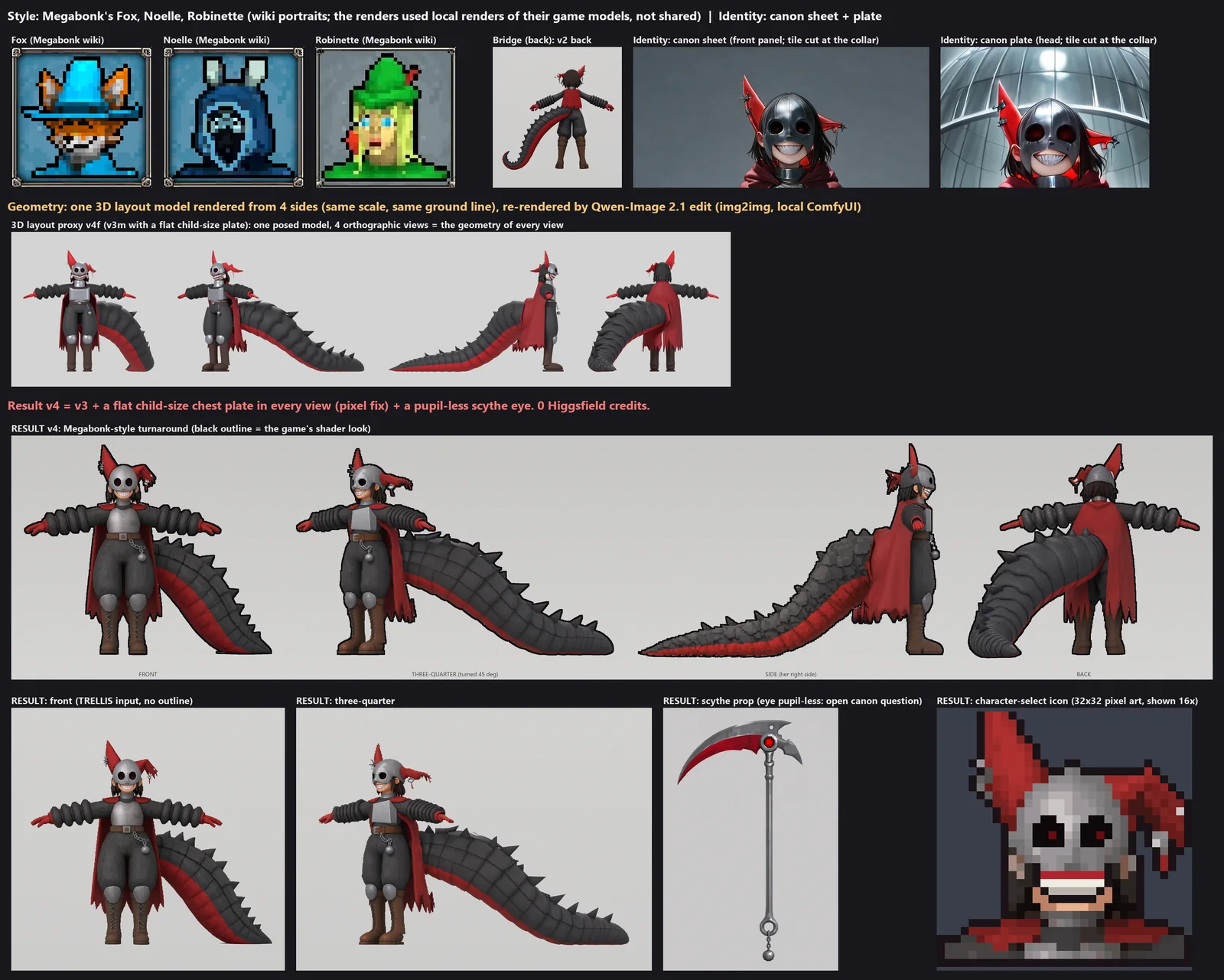
In version 1 her tail is curled to her side in every clip, because that’s how the model was posed. That’s fine in Idle and looks weird in most of the others. Version 2 re-poses the model with the tail straight behind her. Idle still curls it to her side, and Grind swings it a little so it trails along the rail. The in-game shots above are version 2.
New mechanics: the plugin route
Two small plugins came out of this. JefrieSafety, which blocks Steam uploads, is in the safety section below. This is how the other one, Tail Spring, was made.
First, read the game. Cpp2IL turns GameAssembly.dll and its metadata back into C#
signatures: every class, field and method name, with its address, in 42 seconds (114,472
methods). Its ISIL output adds each method’s body as disassembly, in 65 seconds. The signatures
tell you what you can hook. The bodies tell you what the game actually does, and they answered
every “how does this work” question in the job. Claude read the jump that way, down to two
constants stored in the binary: on flat ground a Megabonk jump is an upward kick of 1.5 × the
JumpHeight stat, plus 0.5 × along the ground’s normal.
Then build without a toolchain. No Visual Studio and no NuGet. The .NET SDK’s own compiler,
pointed at the game’s BepInEx\interop, BepInEx\core and dotnet folders, builds a plugin in
about 1.5 seconds. The interop folder only exists after the first modded boot.
Tail Spring patches one method, PlayerMovement.Jump(), because every jump goes through it.
Before the jump it notes who’s playing and whether she’s on the ground. After it, it checks that
the game really jumped and that it was her first jump since landing, then adds upward speed in
the same physics step. Trimmed from the plugin:
if (pm.usedJumps != s.UsedJumpsBefore + 1) return;              // the game didn't jump
if (!s.OnGround || s.UsedJumpsBefore != 0) return;               // air, rail, ladder, wall jump: unchanged
float gameUp = pm.GetJumpForce() / mass * (1.5f + 0.5f * n.y);   // the game's own upward jump speed
float extra = Mathf.Min((k - 1f) * gameUp, MaxExtraUpSpeed);     // k = sqrt(1.6)
rb.AddForce(new Vector3(0f, extra, 0f), ForceMode.VelocityChange);
- On flat ground, starting with no upward or downward speed, it goes about 1.6 times as high. Height grows with the square of launch speed, so 1.2649 times the speed should give 1.6 times the height. Claude’s harness checked it against a control: the same first jump from the ground 2 seconds later, on the same ground, with the boost switched off in memory for that one jump. Both started with no vertical speed. The tail jump took off at 17.71 m/s and peaked at 5.77 m. The control took off at the game’s own 14.00 m/s and peaked at 3.70 m. That’s 1.56 times the height and 1.60 times the take-off speed squared, the same to the hundredth in two runs. Claude’s guess for the small gap is the few ticks the game still counts her as grounded after take-off.
- If she’s already moving up, it goes higher still. When she jumps while already rising, say up a slope or off a ramp, the boost comes on top of that speed. One lab jump that started at 10.74 m/s upward reached 12.46 m.
- Downhill, it goes lower. The game doesn’t cancel her downward speed before a jump, and the plugin adds its full boost on top of whatever is left. Twice the second ground jump started on a downhill slope, still moving down at 3.05 and 9.85 m/s, and those jumps peaked at 3.79 m and 1.12 m. In run 1 an air jump did start from zero. Why that one differs isn’t explained yet.
- Air jumps stay normal. Jefrie has no air jump of her own, so the harness granted her one in the lab, the way an extra-jump item would. The plugin’s counter didn’t move on any of them.
- Items should still count, but that’s read from the code, not measured in the game. The boost scales with her JumpHeight stat, so anything that raises it should raise the tail jump too.
- The game already does this for two characters. The same
Jumpmethod has special code for Monke and Ninja. The plugin checks the same field the game checks, so per-character movement is a pattern Megabonk itself uses. - It fails safe. It looks up every method and field it needs by name when it loads. If one is
missing, say after a game update, it writes one
DISABLEDline to the log, patches nothing, and she jumps normally. - It has a dial.
BepInEx\config\JefrieKit.cfgsets the height multiplier anywhere from 1.0 to 3.0. - The passive slot really is empty. Claude decoded the game’s passive factory from the binary to make sure None creates a passive whose every method is empty. Keeping Float would have meant patching out its slow fall and a hidden damage bonus it gives while she’s airborne.
Every run’s log says the same thing:
[JefrieKit] armed: Tail Spring on PlayerMovement.Jump (prefix+postfix) for eCharacter 304164470. First jump from the ground: height x1.60 (upward speed x1.2649); air, rail, ladder and wall jumps unchanged; other characters untouched.
[JefrieKit] TAIL JUMP #1: first jump from the ground, +3.71 m/s up on top of the game's 14.00 m/s (x1.2649 speed = x1.60 height)
It took one agent about 14 minutes to write, research included, and nothing in it had to change after the game ran it. Whether 1.6 feels right is my playtest’s job, not a log’s.
Doing it safely
This is the part I’d read twice. A modded Megabonk can post scores, change your real save and sync to Steam Cloud, and the lab copy doesn’t stop any of that.
- A lab copy isn’t isolated. Copy the game folder and add a
steam_appid.txtcontaining 3405340 so the copy runs. But it runs on your Steam account as Megabonk, and it shares your saves (%USERPROFILE%\AppData\LocalLow\Ved\Megabonk\), your settings key in the registry (HKCU\Software\Ved\Megabonk) and your Steam stats, achievements and leaderboards with the real game. Whatever you unlock in the lab counts in your real save. - Back up before the first launch. Copy that LocalLow folder and your Steam Cloud folder for
the game (
Steam\userdata\<your id>\3405340), export the registry key, and hash all of it. Then never copy the backup over your live saves. Steam Cloud would sync the old files and could wipe progress you’ve made since. After testing, restore only the registry key andPlayer.log. - Steam Cloud is closer than it looks. Pausing a run writes
progression.jsonintoSaves\CloudDir, which Steam Cloud syncs. Opening the main menu and picking a map write it too. - Turn score uploads off: Settings > Game > Upload Score to Leaderboards > Off. It’s stored in
Saves\LocalDir\config.json, which every copy of the game shares, not in the registry. Turning it off in the lab turned it off for my real game too. With it off, the game’s upload function returns before doing anything. Keep it off for as long as the mod is installed. - Then block uploads anyway. The game has its own mod check (it looks for BepInEx, MelonLoader and Harmony), but it only guards the global leaderboard, and only for big scores. As far as Claude could read the disassembly, the friends boards aren’t checked, and stats and achievements have no check at all. So Claude wrote JefrieSafety: 16 Harmony patches on the game’s Steam wrappers and on Steamworks itself, plus a self-test when it loads. In my first playtest five runs ended, and each time the game tried to upload a score. The log shows all five blocked, along with about 3,100 attempts to write stats. It also blocked about 260 achievement calls, but almost all of those were the game re-syncing achievements at boot, not anything I unlocked. If you ship a gameplay mod, ship something like it.
- Your local progress still changes. JefrieSafety stops what goes to Steam, not what the game writes to its own save files. Claude’s test harness goes further and blocks save writes too: my live saves were byte-identical before and after each of its three runs.
- Write the uninstaller before you install. Ours removes exactly the files the mod added (235 in version 2), checking each one’s hash. Anything BepInEx created while running gets moved aside, not deleted. It never touches saves, the registry or the backups, and it waits for Enter before its window closes. It passed 52 of 52 checks on a mock copy of the game folder before it went anywhere near the real one.
- “Verify integrity of game files” does not remove BepInEx. Steam only checks its own files, and everything BepInEx adds is an extra file. Use the uninstaller.
- A Steam update can break BepInEx or the loader. The loader broke once already, in December 2025. Steam updated Megabonk at 00:01 on the night we started, and the fixed loader still worked on it.
- Leave online play and the anti-cheat alone. None of this needs them.
- The game takes over your screen. It ignores windowed launch options and opened borderless at 1920×1080 on my main monitor every time. The agents launched the lab 11 times before I asked them to stop and did the playtesting myself. Later I let Claude back in for three short scripted runs, announced first and run on the integrated GPU so they wouldn’t fight my other work for the graphics card.
The traps that cost the most time
- Prove the loader before you build. The original loader is broken on the current game. A known-good character tells you that in 20 minutes instead of after a day of work.
- Windows’ 260-character path limit. The maker repo’s deepest file path is 151 characters. Nested inside a normal project folder it went over 260 and git couldn’t check it out. Keep the project folder short.
- The build menu fails silently. If two characters use the same asset, Build Custom Assets fails for all of them, logs “Build failed”, and Unity exits as if everything went fine. Give each character its own copies and search the log.
- One material per skin. The game applies the skin’s materials to the body mesh, so a second material gets drawn over her. Put the body and the prop on one texture.
- The maker’s example values ship with your character. A character created in code inherits the test character’s stat modifiers, including +45 pickup range. Write an empty list, not null. Stat category ratios created in code come out as zeros, so copy real values from an example.
- Unity’s default pose is the first frame of the first clip, not the bind pose. A scythe attached at the bind pose landed 1.2 units from her hand. Export the bind pose as the default pose and give the prop its own bone.
- Blender’s FBX export has three traps. Export one NLA strip per clip, so the takes are named
Idleand notArmature|Idle. Bake the game’s scale into the data, because the global scale option only wrote a unit-scale number. And ground the model by its soles, not its lowest vertex: her tail tip sits lower than her boots. - The loader’s tail physics has no floor. Its JiggleRig gives tails bone physics, but there’s no ground plane, and Jefrie’s tail rests on the ground. Her follow-through is baked into the clips instead.
- You might never meet a rail. On this build the number of rails isn’t set per map. It’s one
number on the scene every generated map uses, and Claude found no rails on Forest at two tiers
or on the Graveyard. No generated map spawned a rail on this build. To test Grind, its harness
spawns the game’s own
Rail1prefab and teleports her feet onto it. From there the game’s own rail detection starts the grind, which it did on the first try. The menu also remembers your last map and tier. - A scripted jump that never lets go. The first version of Claude’s harness pressed jump for three physics ticks and never released it. She hopped on every landing, and on the rail the game read the held button as a jump and threw her off, so run 1 has no grind. Releasing the button fixed both.
- Screenshots from inside the game don’t work. Unity’s own capture calls fail under the interop, and one attempt crashed the game. Capture the window from outside instead.
What I’d try next
Most of these come from names in the game’s code dump. Apart from the rail trick and the harness, which Claude used for this post, none of them has been tried.
- Give a character a base-game weapon. The loader’s json can’t reference one, but the game
has
DataManager.GetWeapon(EWeapon)andWeaponInventory.AddWeapon(...). Megabonk already has a scythe,EWeapon.Scythe, number 30, with its own projectile class. A small plugin could hand Jefrie the real one when a run starts. - More movement for one character. Tail Spring is one patch on
PlayerMovement.Jump.CanJump, the air-jump counter, the wall-climb window, ladders and rails all live in the same class. A wall-run for one character, a dash (the game has anAbilityDash), or a landing that damages enemies are the same shape of mod. - Rails everywhere.
SpawnInteractables.numRailsdecides how many rails a stage gets, and on this build it’s 0. A plugin could raise it. Claude’s harness already does the other half in the lab: it spawns the game’s ownRail1prefab and teleports her feet onto it, and the game’s rail detection starts the grind by itself. Raising the number on real maps hasn’t been tried. - A new challenge. Challenges are small classes with
Init,TickandCleanup: Blind, Inverted Controls, Lava, No Movement, Speedrun, Smol Boi and eight more. Changing one is a plugin. Registering a brand-new one should be possible with Il2CppInterop’s class injector, which nobody has tried here yet. - Rebalance from data.
DataManagerholds the game’s lists of weapons, tomes, items, enemies, maps and encounters, and fires an event when they’ve loaded. A plugin listening for it could retune numbers without patching any logic. - Your own swarms. Stages run on a timeline of events (add an enemy type, a mini-boss, a swarm), and the game has separate summoners for bosses, swarms and challenges. A boss rush or an all-skeletons mode looks like a timeline edit.
- A soundtrack or hats.
DataManageralso keeps lists of music tracks and hats. Both are data, so an AssetBundle plus a small plugin to add them to the lists might be all it takes. - Item reworks. Each item has its own class (more than 80 of them), so one patch changes one item.
- The debug console. The game ships one, with four commands Claude could find: GetSeed, Help, SetResetTime and SetSeedCrypt. Adding “spawn a rail” or “give weapon” would make every other idea on this list easier to test. I don’t know yet how it opens.
- A harness that plays the game. Claude’s lab harness drives Megabonk through its own methods (menus, character select, map, movement input), takes its own screenshots, blocks save writes and never lets a run reach game over. In one launch it took Sonic through every test (20.5 m of running, a 5.34 m jump, a 28 m fall and 10 kills in 83 seconds), and later it ran Jefrie three times and measured her tail jump against a control jump. If you mod with agents, that’s what turns “I think it works” into a folder of evidence.
What it took
- Time. The first agent started at 00:21 on 4 October. Version 1 was ready for my playtest at 16:41, and I played it at 18:23. The reference sheet was the long pole: 7.5 hours, three rounds and 79 image renders on my laptop. After that the sheet track sat idle for almost five hours before the next phase started.
- Agents. The first phase ran 14 agents (five parallel tracks, each checked by an adversarial verifier) over about 12.4 hours and 5.06 million subagent tokens. The phase that built the model, rig, clips and bundle ran 10 agents in 2.94 hours. Version 2 (the straight tail, Tail Spring, the AI rigging tests and the drafts of both posts) ran 16 agents in 5.1 hours. Research and prep runs in between aren’t in those numbers.
- Testing. My own playtest of version 1, then Claude’s three scripted runs of version 2, from 00:45 to 00:59 on the 5th, with a cap of four launches.
- Disk. Unity 2023.2.22f1 is 5.6 GB and its installer was 3.3 GB. The code dump and rips were about 1.9 GB.
- Money. Nothing beyond my own laptop and GPU. 0 Higgsfield credits.
In the Inscryption post I wrote that an IL2CPP game would be a much bigger job than a Mono one. It was, but not where I expected. The code was the small part: the plugin that gives Jefrie a jump the game never had took one agent 14 minutes, research included. The art took most of a day. And the most careful work went into the parts nobody sees, because the lab copy shares my save, my Steam account and my leaderboard setting with the game I actually play. A new character is a data problem, a new mechanic is a reading problem, and keeping both off the leaderboards is a problem you have to remember you have.